warning Important: Third-Party Services Disclaimer
- Payment Gateways: Razorpay, Flutterwave, Paystack, and PhonePe require separate accounts and may have transaction fees
- Map Services: RouteMappy requires a valid subscription/license
- Firebase Services: Firebase Realtime Database and Firebase Cloud Messaging require a Firebase project (free tier available with usage limits)
- SMS Services: Twilio or similar SMS providers require credits/account for OTP and notification delivery
- Email Services: SMTP service or email provider account required for transactional emails
- Font Services: Bunny Fonts is free and open-source (included)
- Hosting: Web hosting, domain, SSL certificate, and app store deployment accounts are not included
These services are not included with the purchase and must be configured by the buyer.
info
What comes with Grab2Buy
Admin Panel, Vendor Panel, Customer App, Vendor App, Delivery Partner App, and Customer Landing Page — all included.
Introduction
Welcome to Grab2Buy, a powerful multi-vendor on-demand delivery marketplace built to transform how businesses sell and how customers shop. The platform connects local vendors, sellers, and delivery partners through a centralized ecosystem, enabling businesses to list and manage their products across diverse categories — from groceries and electronics to fashion and fresh meats — while customers enjoy a seamless doorstep delivery experience. With a robust admin panel, dedicated mobile apps for vendors and delivery partners, and a fully dynamic marketing landing page, Grab2Buy provides everything needed to launch and scale a modern multi-store delivery business.
Core Features
- Multi-Vendor Marketplace
- Product Management Across Multiple Categories
- Real-Time Order Tracking
- Live Delivery Partner Location Tracking
- Multiple Payment Gateway Integration
- Vendor & Delivery Partner Dashboards
- KYC Verification for Vendors & Partners
- Push Notifications via Firebase
- Advanced Search & Filter Options
- Dynamic Marketing Landing Page
- Voice-Based Search (Customer App)
- Earnings & Analytics Dashboard
- Withdrawal Management for Vendors & Partners
check_circle
White-Label Solution
Grab2Buy is delivered as a white-label platform, allowing businesses to customize branding, configurations, services, and operational workflows according to their business requirements.
Getting Started
lightbulb
Prerequisite Knowledge
Basic knowledge of Laravel, React Native, React, Firebase services, RouteMappy integration, payment gateway setup, and mobile application deployment is recommended before installation and customization.
hub Third Party Services
hub Third Party Dependencies
Grab2Buy integrates with several third-party services to provide functionality such as real-time database, payment processing, and mapping services. These services are not included with the purchase package and must be configured using your own accounts and credentials where applicable.
| Service | Purpose | Required |
|---|---|---|
| Firebase Realtime Database | Live order tracking, delivery partner location sync, and real-time data updates | Yes |
| Firebase Cloud Messaging (FCM) | Push notifications for order updates and alerts | Yes |
| Razorpay | Online payment processing (India) | Optional |
| Flutterwave | Online payment processing (Africa) | Optional |
| PhonePe | UPI payments via WebView (India) | Optional |
| RouteMappy Maps | Maps, routing, address search, navigation, and location services | Yes |
database Firebase
Grab2Buy utilizes Firebase Realtime Database for real-time data synchronization, live order tracking, and delivery partner location updates. Firebase Cloud Messaging (FCM) is used for push notifications across all mobile applications.
To set up Firebase services, you need to create a Firebase project and configure the following:
- Firebase Realtime Database - For live order tracking and partner location sync
- Firebase Cloud Messaging - For push notifications
- Firebase Console - https://console.firebase.google.com/
Note: Firebase offers a free tier with usage limits.
payments Payment Gateways
Grab2Buy supports multiple payment gateways to cater to different regions and customer preferences. You can enable one or more of these based on your business requirements.
Razorpay
Payment processing for India. Supports credit/debit cards, UPI, net banking, and wallets.
https://razorpay.com/Flutterwave
Payment processing for Africa. Supports cards, bank transfers, mobile money, and more.
https://flutterwave.com/map RouteMappy Maps
Grab2Buy utilizes RouteMappy as its mapping and location service provider. RouteMappy offers customizable mapping capabilities including route calculation, address search, navigation support, service area management, and location-based functionality across all applications.
If you require RouteMappy Maps for your application, please contact the RouteMappy team directly.
- Website: https://routemappy.com/
- Email: sales@menpanitech.com
warning Important Notice
API keys, payment gateway accounts, Firebase project setup, RouteMappy subscriptions or licensing fees, hosting services, domain registration, and SSL certificates are not included with the purchase package. Buyers are responsible for creating and maintaining their own third-party service accounts and subscriptions where applicable.
dns Environmental Setup
verified Version Requirements
Ensure the following software versions are installed before proceeding:
Backend Requirements
- PHP: 8.3 or higher
- Laravel: 13.x
- MySQL: 5.7 or higher (8.0 recommended)
- Composer: 2.5 or later
- Apache/Nginx: Latest stable version
Frontend Requirements
- Node.js: 18 or higher
- npm: 10.x or later
- React: 19.2
- Vite: 8.2
- Tailwind CSS: 4.3
Android Development
- Android Studio: 2024.1.1 (Ladybug) or later
- Java JDK: 17 or later (JDK 21 recommended)
- Android SDK: API Level 35 (Android 15)
- Build Tools: 36.0.0 or later
- Gradle: 8.10.2 or later
- React Native: 0.71
iOS Development (macOS only)
- Xcode: 16.x or later (from Mac App Store)
- iOS SDK: iOS 17+
- CocoaPods: 1.15.x or later
- macOS: Sonoma 14.5 or later
- React Native: 0.71
- Apple Developer Account: Required for distribution ($99/year)
warning
Important:
Using older versions may cause compatibility issues. Always use the recommended versions.
System Requirements
Operating System:
- Windows 10/11 (64-bit) - Pro or Enterprise recommended
- macOS Monterey (12.0) or later (Sonoma 14.5+ recommended)
- Linux (Ubuntu 20.04 LTS, 22.04 LTS, or equivalent)
Minimum Hardware:
- Processor: Intel i5 10th Gen (or AMD Ryzen 5) or better
- RAM: 8 GB (minimum), 16 GB recommended for Android Studio
- Storage: 2 GB free disk space for dependencies, SDKs, and build files
- Internet: Broadband connection required for downloading dependencies
Software Requirements
| Tool/Software | Minimum Version | Recommended Version | Purpose |
|---|---|---|---|
| Node.js | v16.x LTS | v20.x LTS or v22.x | React Native & npm scripts |
| npm | v8.x | v10.x or later | Package management |
| PHP | 8.1 | 8.2 or 8.3 | Laravel backend |
| Composer | 2.5 | 2.7 or later | PHP dependency manager |
| MySQL | 5.7 | 8.0 | Database |
| Android Studio | 2023.1 | 2024.1 (Ladybug) | Android APK/AAB build |
| Java JDK | 11 | 17 or 21 | Android compilation |
| Xcode (macOS only) | 15.0 | 16.0 or later | iOS IPA build |
| CocoaPods | 1.12 | 1.15 or later | iOS dependencies |
| Git | 2.30 | Latest | Version control (optional) |
| VS Code | 1.80 | Latest | Code editor (recommended) |
| Web Browser | Chrome 120, Firefox 120, Edge 120 | Latest version | Testing & debugging |
XAMPP Installation
- Download XAMPP from apachefriends.org (version 8.2+ recommended)
- Install XAMPP on your system with default settings
- After installation, start Apache and MySQL services from the XAMPP control panel
- Verify installation by visiting
http://localhostin your browser
info
Alternative Local Servers:
- Laragon (Windows) - Faster and lighter alternative
- MAMP (macOS/Windows) - Easy to use
- Docker (All platforms) - Containerized environment
- Valet (macOS) - Laravel native development
Composer Installation
- Download Composer from getcomposer.org
- Run the installer and follow the setup wizard
- Ensure Composer is added to your system PATH
- Verify installation:
composer --version(should show 2.5+)
terminal
Verify Your Installation
Run these commands in your terminal/command prompt to confirm all required tools are properly installed:
                # Check Node.js version
                node --version   # Should show v20.x or higher

                # Check npm version
                npm --version    # Should show 10.x or higher

                # Check PHP version
                php --version    # Should show 8.2 or higher

                # Check Composer version
                composer --version  # Should show 2.5 or higher

                # Check MySQL version
                mysql --version  # Should show 8.0 or higher

                # Check Java version (for Android)
                java --version   # Should show 17 or higher
check_circle
Success Indicator:
If all commands show the correct versions (or higher), your environment is ready for installation.
error
Troubleshooting:
If any command returns "not found" or shows an older version, please install or update the corresponding software before proceeding.
info
Important Note
Install all required SDKs, development tools, and dependencies using the recommended versions before beginning the installation process. Version mismatches may result in build or runtime issues.
Pro Tip: Use Node Version Manager (NVM) for Node.js version management and Android Studio SDK Manager for maintaining Android SDK compatibility.
memory Technology Stack
Complete Technology Stack
Grab2Buy is built using modern and scalable technologies to power customer applications, vendor applications, delivery partner applications, and administrative operations.
Admin Panel (Laravel + Filament)
| # | Service / Package | Version | Purpose |
|---|---|---|---|
| 1 | Laravel Framework | 13.17 | Core backend framework |
| 2 | Filament | 5.7 | Admin panel UI and CRUD generation |
| 3 | Filament Shield | 4.3 | Role-based permission management |
| 4 | Spatie Laravel Permission | 8.3 | Permission and role system under the hood |
| 5 | Laravel Tinker | 3.0 | REPL for artisan commands |
| 6 | Faker PHP | 1.23 | Fake data generation for testing |
| 7 | Laravel Pint | 1.27 | Code style fixer |
| 8 | Mockery | 1.6 | Mock objects for testing |
| 9 | Collision | 8.6 | Error reporting for testing |
| 10 | PHPUnit | 12.5 | Testing framework |
| 11 | Tailwind CSS | 4.3 | Utility-first CSS via Vite plugin |
| 12 | Vite | 8.2 | Frontend build tool |
| 13 | Laravel Vite Plugin | - | Vite integration with Laravel |
| 14 | Firebase Admin SDK | - | Push notifications via FCM |
| 15 | Razorpay PHP SDK | - | Payment gateway integration |
| 16 | Flutterwave PHP SDK | - | Payment gateway integration |
| 17 | Paystack PHP SDK | - | Payment gateway integration |
| 18 | RouteMappy API | - | Location and maps services |
| 19 | MySQL | 5.7+ | Database |
Landing Page (React + Vite)
| # | Package | Version | Purpose |
|---|---|---|---|
| 1 | React | 19.2 | Core UI library |
| 2 | React DOM | 19.2 | DOM rendering |
| 3 | Vite | 8.2 | Build tool and dev server |
| 4 | Tailwind CSS | 4.3 | Utility-first CSS framework |
| 5 | @tailwindcss/vite | 4.3 | Tailwind plugin for Vite |
| 6 | Framer Motion | 13.1 | Animations and transitions |
| 7 | Swiper | 14.1 | Carousel and slider component |
| 8 | Lucide React | 1.31 | Icon library |
| 9 | React Helmet Async | 3.0 | Dynamic SEO meta tags |
| 10 | clsx | 2.1 | Conditional className utility |
| 11 | Tailwind Merge | 3.6 | Merge Tailwind classes |
| 12 | Sonner | 2.0 | Toast notifications |
| 13 | TypeScript | 6.0 | Type safety |
| 14 | OxLint | 1.75 | Linting |
| 15 | Bunny Fonts | - | Web font delivery (fonts.bunny.net) |
Customer App (React Native)
| # | Package | Purpose |
|---|---|---|
| 1 | React Native | 0.71 |
| 2 | React Navigation | Stack and bottom tab navigation |
| 3 | Redux + React Redux | State management |
| 4 | Axios | HTTP client for API calls |
| 5 | React Native Maps | RouteMappy display and markers |
| 6 | React Native Google Places Autocomplete | Address search and autocomplete |
| 7 | RouteMappy Directions API | ETA calculation and navigation |
| 8 | RouteMappy Geocoding API | Latitude/longitude to address conversion |
| 9 | Firebase Realtime Database | Live order tracking and partner location |
| 10 | Firebase Cloud Messaging | Push notifications |
| 11 | React Native Razorpay | Razorpay payment gateway |
| 12 | Flutterwave React Native | Flutterwave payment gateway |
| 13 | PhonePe WebView | PhonePe UPI payments |
| 14 | React Native Async Storage | Local session and data persistence |
| 15 | React Native Image Picker | Profile photo selection |
| 16 | RN Fetch Blob | Multipart image upload |
| 17 | React Native Voice | Voice-based search |
| 18 | React Native Haptic Feedback | Tactile feedback on interactions |
| 19 | Lottie React Native | Animations |
| 20 | React Native Linear Gradient | Gradient backgrounds |
| 21 | React Native Paper | UI components |
| 22 | React Native Snap Carousel | Banner and product carousels |
| 23 | React Native UI Stepper | Quantity plus/minus controls |
| 24 | React Native Easy Content Loader | Skeleton loading placeholders |
| 25 | React Native Internet Connection Alert | Offline detection |
| 26 | React Native Android Location Enabler | GPS enable prompt |
| 27 | Moment.js | Date formatting |
Vendor App (React Native)
| # | Package | Purpose |
|---|---|---|
| 1 | React Native | 0.71 |
| 2 | React Navigation | Stack and bottom tab navigation |
| 3 | Redux + React Redux | State management |
| 4 | Axios | HTTP client for API calls |
| 5 | React Native Maps | RouteMappy for location selection |
| 6 | RouteMappy Geocoding API | Reverse geocoding for address |
| 7 | Geolocation API | Current GPS position detection |
| 8 | Firebase Realtime Database | Real-time order push notifications |
| 9 | Firebase Cloud Messaging | Push notifications |
| 10 | React Native Sound | New order arrival sound alert |
| 11 | React Native Async Storage | Local session and data persistence |
| 12 | React Native Image Picker | Profile photo selection |
| 13 | RN Fetch Blob | Multipart image upload |
| 14 | React Native Image Base64 | Image to base64 conversion |
| 15 | React Native Haptic Feedback | Tactile feedback on interactions |
| 16 | Lottie React Native | Animations |
| 17 | React Native Linear Gradient | Gradient backgrounds |
| 18 | React Native Easy Content Loader | Skeleton loading placeholders |
| 19 | React Native Internet Connection Alert | Offline detection |
| 20 | React Native Dialog Input | Withdrawal amount input dialog |
| 21 | Moment.js | Date formatting |
Delivery Partner App (React Native)
| # | Package | Purpose |
|---|---|---|
| 1 | React Native | 0.71 |
| 2 | React Navigation | Stack and bottom tab navigation |
| 3 | Redux + React Redux | State management |
| 4 | Axios | HTTP client for API calls |
| 5 | React Native Maps | RouteMappy display and navigation |
| 6 | React Native Fused Location | High-accuracy GPS tracking |
| 7 | RouteMappy Directions API | Navigation to vendor and customer |
| 8 | Firebase Realtime Database | Live partner location sync and order updates |
| 9 | Firebase Cloud Messaging | Push notifications |
| 10 | React Native Push Notification | Local push notifications |
| 11 | React Native Sound | New order arrival sound alert |
| 12 | React Native Chart Kit | Monthly earnings line chart |
| 13 | React Native WebView | Admin chat interface |
| 14 | React Native Async Storage | Local session and data persistence |
| 15 | React Native Image Picker | Profile photo and document selection |
| 16 | RN Fetch Blob | Multipart file upload |
| 17 | React Native Image Base64 | Image to base64 conversion |
| 18 | React Native Haptic Feedback | Tactile feedback on interactions |
| 19 | Lottie React Native | Animations |
| 20 | React Native Linear Gradient | Gradient backgrounds |
| 21 | React Native Easy Content Loader | Skeleton loading placeholders |
| 22 | React Native Internet Connection Alert | Offline detection |
| 23 | React Native Dialog Input | Withdrawal amount input dialog |
| 24 | Moment.js | Date formatting |
External API Services (Shared Across All Apps)
| # | Service | Used In | Purpose |
|---|---|---|---|
| 1 | Firebase Realtime Database | All 3 Apps | Live order tracking and delivery partner location |
| 2 | Firebase Cloud Messaging | All 3 Apps | Push notifications |
| 3 | RouteMappy SDK | All 3 Apps + Admin | Map display, markers, navigation |
| 4 | RouteMappy Places API | Customer App | Address autocomplete and search |
| 5 | RouteMappy Directions API | Customer + Partner App | ETA calculation and route navigation |
| 6 | RouteMappy Geocoding API | Vendor + Partner App | Lat/lng to address conversion |
| 7 | Razorpay | Customer App + Admin | Payment processing (India) |
| 8 | Flutterwave | Customer App + Admin | Payment processing (Africa) |
| 9 | PhonePe | Customer App | UPI payments via WebView |
| 10 | Bunny Fonts | Landing Page | Web font delivery |
info
Important Note
Install all required SDKs, development tools, and dependencies using the recommended versions before beginning the installation process. Version mismatches may result in build or runtime issues.
Pro Tip: Use Node Version Manager (NVM) for Node.js version management and Android Studio SDK Manager for maintaining Android SDK compatibility.
view_module Project Dependencies
Project Dependencies Overview
Grab2Buy consists of three mobile applications:
Customer App
For end-users to browse and order products
Vendor App
For vendors to manage products and orders
Delivery Partner App
For delivery partners to manage deliveries
info
Common Base Version: React Native 0.71.3 with React 18.2.0
Core Libraries
These libraries provide the core framework functionality and handle state management, navigation, API communication, and date processing.
| Package | Version | Customer | Vendor | Delivery | Purpose |
|---|---|---|---|---|---|
| react | 18.2.0 | check_circle | check_circle | check_circle | UI Library |
| react-native | 0.71.3 | check_circle | check_circle | check_circle | Cross-platform mobile framework |
| react-redux | ^8.0.5 | check_circle | check_circle | check_circle | State management |
| redux | ^4.2.1 | check_circle | check_circle | check_circle | State container |
| axios | ^1.3.3 | check_circle | check_circle | check_circle | HTTP client for API calls |
| moment | ^2.29.4 | check_circle | check_circle | check_circle | Date and time formatting |
Navigation Libraries
These libraries handle screen navigation, routing, and tab management within the applications.
| Package | Version | Customer | Vendor | Delivery | Purpose |
|---|---|---|---|---|---|
| @react-navigation/native | ^6.1.4 | check_circle | check_circle | check_circle | Core navigation library |
| @react-navigation/native-stack | ^6.9.10 | check_circle | check_circle | check_circle | Stack navigation |
| @react-navigation/bottom-tabs | ^6.5.5 | check_circle | check_circle | check_circle | Bottom tab navigation |
| @react-navigation/material-bottom-tabs | ^6.2.13 | check_circle | check_circle | check_circle | Material Design bottom tabs |
| @react-navigation/stack | ^6.3.14 | check_circle | check_circle | check_circle | Stack navigation (legacy) |
| react-native-screens | ^3.20.0 | check_circle | check_circle | check_circle | Native screen optimization |
| react-native-safe-area-context | ^4.5.0 | check_circle | check_circle | check_circle | Safe area handling |
| @react-native-masked-view/masked-view | ^0.2.8 | check_circle | check_circle | check_circle | Masked view for navigation |
Maps and Location
These libraries enable map rendering and location tracking within the applications.
| Package | Version | Customer | Vendor | Delivery | Purpose |
|---|---|---|---|---|---|
| react-native-maps | ^1.4.0 | check_circle | check_circle | check_circle | Map rendering with RouteMappy |
| @react-native-community/geolocation | ^3.0.5 | check_circle | check_circle | check_circle | GPS location services |
| react-native-android-location-enabler | ^2.0.1 | check_circle | cancel | cancel | Android location services |
| react-native-fused-location | ^1.1.2 | cancel | cancel | check_circle | Fused location provider (Delivery only) |
| react-native-google-places-autocomplete | ^2.5.7 | check_circle | cancel | cancel | Address autocomplete (Customer only) |
Firebase Services
Firebase is integrated to support real-time notifications and data synchronization.
| Package | Version | Customer | Vendor | Delivery | Purpose |
|---|---|---|---|---|---|
| @react-native-firebase/app | ^21.6.1 | check_circle | check_circle | check_circle | Firebase core |
| @react-native-firebase/database | ^21.10.0 | check_circle | check_circle | check_circle | Real-time database |
| @react-native-firebase/messaging | ^21.6.1 | check_circle | check_circle | check_circle | Push notifications |
| react-native-push-notification | ^8.1.1 | check_circle | check_circle | check_circle | Local push notifications |
| @react-native-community/push-notification-ios | ^1.10.1 | check_circle | check_circle | check_circle | iOS push notifications |
UI and Animation Libraries
These libraries enhance the user interface and animation experience.
| Package | Version | Customer | Vendor | Delivery | Purpose |
|---|---|---|---|---|---|
| react-native-reanimated | ^3.6.2 | check_circle | check_circle | check_circle | Smooth animations |
| react-native-gesture-handler | ^2.9.0 | check_circle | check_circle | check_circle | Gesture-based interactions |
| lottie-react-native | ^5.1.5 | check_circle | check_circle | check_circle | Animated illustrations |
| react-native-paper | ^5.2.0 | check_circle | check_circle | check_circle | Material Design components |
| react-native-vector-icons | ^9.2.0 | check_circle | check_circle | check_circle | Icon library |
| react-native-linear-gradient | ^2.8.3 | check_circle | check_circle | check_circle | Gradient backgrounds |
| react-native-animatable | ^1.3.3 | check_circle | check_circle | check_circle | Pre-built animations |
| react-native-drop-shadow | ^0.0.6 | check_circle | check_circle | check_circle | Drop shadow effects |
| react-native-svg | ^13.8.0 | check_circle | check_circle | check_circle | SVG rendering |
| react-native-modal | ^13.0.1 | check_circle | check_circle | check_circle | Modal dialog components |
| react-native-snap-carousel | ^3.9.1 | check_circle | cancel | cancel | Carousel/slider (Customer only) |
| react-native-ratings | ^8.1.0 | check_circle | check_circle | check_circle | Star rating component |
| react-native-raw-bottom-sheet | ^2.2.1 | check_circle | check_circle | check_circle | Bottom sheet component |
Device Features
These libraries enable the application to interact with native device capabilities.
| Package | Version | Customer | Vendor | Delivery | Purpose |
|---|---|---|---|---|---|
| @react-native-async-storage/async-storage | ^1.17.11 | check_circle | check_circle | check_circle | Local data persistence |
| @react-native-community/netinfo | ^11.4.1 | check_circle | check_circle | check_circle | Network connectivity monitoring |
| @react-native-community/datetimepicker | ^6.7.5 | check_circle | check_circle | check_circle | Date/time picker component |
| @react-native-picker/picker | ^2.10.2 | check_circle | check_circle | check_circle | Dropdown/picker component |
| react-native-image-picker | ^5.0.2 | check_circle | check_circle | check_circle | Image selection from camera/gallery |
| rn-fetch-blob | ^0.12.0 | check_circle | check_circle | check_circle | File upload and download |
| react-native-haptic-feedback | ^2.3.3 | check_circle | check_circle | check_circle | Device vibration/haptic feedback |
| react-native-image-base64 | ^0.1.4 | check_circle | check_circle | check_circle | Image to base64 conversion |
| react-native-sound | ^0.11.2 | check_circle | check_circle | check_circle | Audio playback for notifications |
| @react-native-segmented-control/segmented-control | ^2.4.0 | check_circle | check_circle | check_circle | Segmented control component |
| react-native-get-random-values | ^1.11.0 | check_circle | cancel | cancel | Cryptographic random values (Customer only) |
Payment Integration
The application integrates multiple payment gateways to support secure online transactions.
| Package | Version | Customer | Vendor | Delivery | Purpose |
|---|---|---|---|---|---|
| react-native-razorpay | ^2.3.0 | check_circle | check_circle | check_circle | Razorpay payment gateway |
| flutterwave-react-native | ^1.0.4 | check_circle | check_circle | check_circle | Flutterwave payment gateway |
Customer-Only Libraries
These libraries are specific to the Customer application.
| Package | Version | Purpose |
|---|---|---|
| @react-native-voice/voice | ^3.2.4 | Voice-based search |
| react-native-app-intro-slider | ^4.0.4 | Onboarding/intro slides |
| react-native-dialog | ^9.3.0 | Dialog boxes |
| react-native-dialog-input | ^1.0.8 | Input dialog boxes |
| react-native-dropdownalert | ^4.5.1 | Dropdown alert notifications |
| react-native-easy-content-loader | ^0.3.2 | Content loading placeholders |
| react-native-fast-image | ^8.6.3 | Fast image loading and caching |
| react-native-image-slider-box | ^2.0.7 | Image slider component |
| react-native-image-slider-show | ^1.0.3 | Image slider show component |
| react-native-internet-connection-alert | ^0.1.9 | Internet connection alerts |
| react-native-loading-spinner-overlay | ^3.0.1 | Loading spinner overlay |
| react-native-phone-input | ^1.3.7 | Phone number input with country codes |
| react-native-phone-number-input | ^2.1.0 | Phone number input component |
| react-native-progress | ^5.0.1 | Progress bars and indicators |
| react-native-skeleton-placeholder | ^5.2.4 | Skeleton loading placeholders |
| react-native-star-rating | ^1.1.0 | Star rating component |
| react-native-ui-stepper | ^1.2.4 | UI stepper component |
| react-native-video | ^5.2.1 | Video player component |
| react-native-video-controls | ^2.8.1 | Video player controls |
| react-native-youtube | ^2.0.2 | YouTube video player |
| @gorhom/bottom-sheet | ^5.0.6 | Bottom sheet component |
| lottie-ios | ^3.4.0 | Lottie animations iOS support |
Delivery Partner-Only Libraries
These libraries are specific to the Delivery Partner application.
| Package | Version | Purpose |
|---|---|---|
| react-native-chart-kit | ^6.12.0 | Monthly earnings line chart |
| react-native-fused-location | ^1.1.2 | High-accuracy GPS tracking |
| react-native-android-location-enabler | ^1.2.2 | Android location services |
Admin Panel Dependencies (Composer)
The admin panel is built with Laravel and uses Composer for PHP dependency management.
Production Dependencies
- barryvdh/laravel-dompdf: ^3.1 - PDF generation
- bezhansalleh/filament-shield: ^4.3 - Role-based permission management
- kreait/firebase-php: ^8.4 - Firebase services integration
- filament/filament: ^5.7 - Admin panel UI and CRUD generation
- laravel/framework: ^13.17 - Core backend framework
- laravel/tinker: ^3.0 - REPL for artisan commands
- spatie/laravel-permission: ^8.3 - Permission and role system
Development Dependencies
- fakerphp/faker: ^1.23 - Fake data generation
- laravel/pint: ^1.27 - Code style fixer
- mockery/mockery: ^1.6 - Mock objects for testing
- nunomaduro/collision: ^8.6 - Error reporting for testing
- phpunit/phpunit: ^12.5.12 - Testing framework
- laravel/pao: ^1.0.6 - Performance optimization
Landing Page Dependencies (React + Vite)
The landing page is built with React and uses npm for JavaScript dependency management.
Production Dependencies
- @tailwindcss/vite: ^4.3.3 - Tailwind plugin for Vite
- clsx: ^2.1.1 - Conditional className utility
- framer-motion: ^13.1.0 - Animations and transitions
- lucide-react: ^1.31.0 - Icon library
- react: ^19.2.8 - Core UI library
- react-dom: ^19.2.8 - DOM rendering
- react-helmet-async: ^3.0.0 - Dynamic SEO meta tags
- sonner: ^2.0.8 - Toast notifications
- swiper: ^14.1.0 - Carousel and slider component
- tailwind-merge: ^3.6.0 - Merge Tailwind classes
- tailwindcss: ^4.3.3 - Utility-first CSS framework
Development Dependencies
- @types/node: ^24.13.3 - Node.js type definitions
- @types/react: ^19.2.17 - React type definitions
- @types/react-dom: ^19.2.3 - React DOM type definitions
- @vitejs/plugin-react: ^6.0.4 - React plugin for Vite
- oxlint: ^1.75.0 - Linting
- typescript: ~6.0.2 - Type safety
- vite: ^8.2.0 - Build tool and dev server
Dependency Summary
Customer App:
- Total Dependencies: 70 packages
- Base Version: React Native 0.71.3
Vendor App:
- Total Dependencies: 55 packages
- Base Version: React Native 0.71.3
Delivery App:
- Total Dependencies: 56 packages
- Base Version: React Native 0.71.3
Admin Panel:
- PHP Dependencies: 7 packages
- Dev Dependencies: 6 packages
person Customer Application Guide
Customer App Working Flow
1
Register / Login / Forgot Password
- Download the Grab2Buy Customer App
- App launches with Splash Screen, then prompts for Phone Number
- Enter your mobile number – an OTP will be sent via SMS
- Verify the OTP, then complete registration with full name, email, password
- For returning users, login via OTP or password
- Use Forgot Password to reset your password
2
Select Language & Allow Location
- Select your preferred Language from the available options
- GPS Location is automatically detected for accurate service
- Fetch Nearby Vendors Based on your current location
- Use Address Search to manually set delivery location
- Save frequent addresses to Favourites for quick selection
3
Browse Categories & Select Vendor
- Browse Categories – Grocery, Electronics, Fashion, etc.
- Select Category to view vendors under that category
- Select Vendor to view their products and services
- View Vendor Subcategories to filter products
- Filter Products by Subcategory for precise browsing
4
View Products & Add to Cart
- View Product Details – name, description, price, images, ratings
- Add Products to Cart with quantity selection
- Update Cart Quantity or Remove Products from cart
- If adding items from a different vendor while cart has items from another vendor → Confirmation alert appears
5
Apply Promo, Tax & Checkout
- Apply Promo Code for discounts
- Calculate Subtotal + Discount + Tax + Delivery/Service Charges
- Apply Wallet Balance towards the order total
- Select / Add Delivery Address from saved addresses
- Select Payment Method:
- Cash on Delivery
- Razorpay – Cards, UPI, Net Banking, Wallets
- Flutterwave – Cards, Bank Transfers, Mobile Money
- PhonePe – UPI payments via WebView
- Place Order – Order is sent to Vendor
6
Track Order & Delivery
- Track Order Status in real-time
- View Assigned Partner details
- Track Partner location on RouteMappy map
- Call Customer, Vendor or Partner directly from the app
- Receive Order at your doorstep
- Confirm Delivery via OTP or delivery proof
- Order Completed – status updated
7
Order History & Ratings
- View Order History – All past orders with details
- Rate / Review Vendor and Partner – 5-star rating with text review
8
Wallet & Profile Management
- Manage Wallet – View balance, add money, view transactions
- Add Money via Razorpay or Flutterwave
- Manage Profile – Update name, email, phone, profile picture
- Manage Addresses – Add, edit, delete addresses (Home, Work, Other)
- Select Language – Switch between supported languages
- Manage Notifications – Enable/disable notification preferences
- Favourite Vendors – View saved vendor list
- FAQ – Browse categories and questions
- Privacy Policy – Read privacy information
- Contact Admin – Chat feature for support
lightbulb
Pro Tip: Enable notifications to receive order updates. Save your frequent addresses and favourite vendors for faster checkout.
storefront Vendor Application Guide
Vendor App Working Flow
1
Register / Login / Forgot Password
- Download the Grab2Buy Vendor App
- Enter your phone number and verify via OTP
- Complete registration with personal details (name, email, password)
- For returning users, login via OTP or password
- Use Forgot Password to reset your password
2
Complete Profile & Submit KYC
- Complete Vendor Profile – Store name, description, logo, banner
- Submit Business / KYC / Bank Details:
- Business License / Registration Certificate
- Identity Proof (Aadhaar, PAN, etc.)
- Store/Shop Photos
- Bank Account Details for withdrawals
- Submit for Admin Verification – account becomes active upon approval
- Vendor Approved – Ready to go online
3
Manage Store & Products
- Set Online / Offline Status – Go online to start receiving orders
- Manage Store Profile – Update store details, timings, address
- Manage Categories / Subcategories – Create and organize product categories
- Add / Edit / Delete Products – Manage your product catalog
- Manage Product Price, Discount, Tax and Stock – Update product details
4
Receive & Process Orders
- Receive Customer Order – Notification with sound alert
- View Order Details – Items, quantities, prices, customer address
- Accept / Reject Order – Confirm or decline the order
- Change Order Status – Update as order progresses
- Process Order – Prepare items for delivery
- Mark Order Ready for Pickup – Notify delivery partner
5
Partner Assignment & Delivery
- System Checks Delivery Zone – Verifies customer location
- Find Available Partners in the Zone – Nearest partner matching
- Assign / Send Order to Partner – Order sent to partner app
- Partner Accepts Delivery – Partner confirms pickup
- Partner Picks Up Order – Order collected from vendor
- Vendor Tracks Order Status – Monitor delivery progress
- Order Completed – Delivery confirmed
6
Earnings & Withdrawals
- View Order History – All past orders with details
- View Earnings – Total revenue from orders
- View Commission / Tax / Net Earnings – Breakdown of earnings
- Manage Vendor Wallet – View balance and transactions
- View Wallet Transactions – All credits and debits
- Add Bank / Withdrawal Details – Update bank account
- Request Withdrawal – Enter amount and submit request
- View Withdrawal Status – Pending, Approved, Rejected
7
Profile & Settings
- Manage Notifications – Enable/disable notification preferences
- Manage Profile – Update name, email, profile picture
- Manage Business Details – Update store information
- Manage Settings – App preferences and configurations
- Help Center – FAQs and support
- Logout or Delete Account – Account management
info
Note: Keep your catalog updated and stock accurate. Quick order processing leads to better ratings and more orders. Complete KYC verification before going online.
delivery_dining Delivery Partner Application Guide
Delivery Partner App Working Flow
1
Register / Login / Forgot Password
- Download the Grab2Buy Delivery Partner App
- Enter your phone number and verify via OTP
- Complete registration with personal details (name, email, password)
- For returning users, login via OTP or password
- Use Forgot Password to reset your password
2
Complete Profile & Submit KYC
- Complete Partner Profile – Name, phone, email, profile photo
- Submit KYC / Vehicle / Bank Details:
- Driving License
- Vehicle RC (Registration Certificate)
- Vehicle Insurance
- Aadhar Card / Identity Proof
- Bank Account Details for withdrawals
- Submit for Admin Verification – account becomes active upon approval
- Partner Approved – Ready to go online
3
Set Online / Offline Status
- Set Online / Offline Status – Go online to start receiving delivery requests
- App tracks GPS location every 5 seconds and updates to Firebase in real time
- RouteMappy Map displays partner's current location
4
Receive Delivery Request
- Receive Delivery Request – Notification with sound alert
- View Vendor Location – Vendor address and map location
- View Customer Location – Customer delivery address
- View Order Details – Items list, quantities, total amount
- View Estimated Distance / Earnings – Delivery distance and earning amount
- Accept / Reject Delivery Request – Confirm or decline the delivery
- If partner does not respond, order may be assigned to another partner
5
Navigate to Vendor & Pickup Order
- Navigate to Vendor – RouteMappy directions to vendor location
- Call Vendor – Contact vendor if needed
- Arrive at Vendor – Tap "Reached Vendor" button
- Confirm Order Pickup – Collect order from vendor
6
Navigate to Customer & Deliver
- Navigate to Customer – RouteMappy directions to customer address
- Track Delivery – Real-time tracking of delivery progress
- Call Customer – Contact customer if needed
- Arrive at Customer – Tap "At Point" button
- Deliver Order – Hand over order to customer
- Confirm Delivery Through OTP / Proof – Enter OTP or capture delivery proof
- Mark Order Completed – Delivery confirmed
7
History & Earnings
- View Delivery History – All past deliveries with details
- View Earnings – Total earnings from deliveries
- View Commission / Bonuses / Net Earnings – Breakdown of earnings
- Manage Partner Wallet – View balance and transactions
- View Wallet Transactions – All credits and debits
- Add Bank / Withdrawal Details – Update bank account
- Request Withdrawal – Enter amount and submit request
- View Withdrawal Status – Pending, Approved, Rejected
8
Profile & Settings
- Manage Notifications – Enable/disable notification preferences
- Manage Profile – Update name, email, profile picture
- Manage Documents – Update KYC documents
- Manage Vehicle – Update vehicle details
- Manage Settings – App preferences and configurations
- Help Center – FAQs and support
- Logout or Delete Account – Account management
info
Note: Keep the app online and GPS enabled to receive delivery requests. Maintain good ratings for more order opportunities. Complete KYC verification before going online.
admin_panel_settings Admin Panel Guide
Admin Panel Working Flow
The Grab2Buy Admin Panel (built with Filament 5) provides complete control over the platform. Below is the detailed menu structure and functionality.
sync End-to-End Loop
- Customer browses categories → Adds items to cart → Checks out
- Payment gateway processes payment (Razorpay/Flutterwave/PhonePe)
- Order assigned to Vendor → Vendor accepts and prepares order
- Delivery Partner picks up and delivers → Ratings collected
- Commission deducted → Earnings settle into wallets
- Withdrawal requests → Admin approves → Payout processed
- FCM notifications + chat keep everyone connected
admin_panel_settings
Access URL:
http://yourdomain.com/admin
Default Credentials: admin / admin
warning
Security Note: Change default admin password immediately after first login!
| Menu Section | Sub-Menu Items | Functionality |
|---|---|---|
| Dashboard | ||
| Dashboard | - | Overview of platform analytics – Total revenue, today's revenue, total orders, today's orders, total customers, total vendors, active vendors, total delivery partners, online delivery partners, total items, pending approvals, average rating, delivered orders, cancelled orders. Revenue trend chart (last 6 months). Recent orders and recent customers. |
| Configuration | ||
| Customer App Settings | - | Configure app name, default currency, currency short code, delivery charge per km, app version, max cash validation, capital lat/lng |
| Delivery Boy App Settings | - | Configure app name, app logo, default currency, delivery charge per km, app version, booking searching radius |
| Vendor App Settings | - | Configure app name, app logo, default currency, order commission percentage, app version |
| Map Settings | - | Configure RouteMappy: Tiles, Routing, Places, Geocode, Reverse Geocode |
| Settings | ||
| User Types | - | Manage system user roles and statuses |
| Zones | - | Create and manage delivery zones with polygon coordinates |
| Address Types | - | Manage address tags (Home, Work, Other) |
| Complaint Types | - | Define complaint categories and statuses |
| Banners | - | Manage promotional banners with images and status |
| Cancellation Reasons | - | Define predefined reasons for order cancellations |
| Statuses | - | Manage global system statuses (Order statuses, etc.) |
| Taxes | - | Define tax rules with name, percentage, and status |
| Customers | ||
| Customers | - | View and manage all registered customers – Name, profile picture, email, phone, status |
| Customer Addresses | - | View customer saved addresses |
| Customer Wallet Histories | - | Track customer wallet transactions |
| Customer Promo Histories | - | View promo code usage by customers |
| Favourite Items | - | View customer's favourite items |
| Favourite Vendors | - | View customer's favourite vendors |
| Vendors | ||
| Vendors | - | View and manage all vendors – Category, vendor name, image, contact person, phone, online status, rating, approval status. Approve/reject new vendor registrations. |
| Vendor Earnings | - | Track vendor earnings per order |
| Vendor Wallet Histories | - | Track vendor wallet transactions |
| Vendor Withdrawals | - | Process vendor withdrawal requests – Approve/reject, view amount and message |
| Delivery Partners | ||
| Delivery Boys | - | View and manage all delivery partners – Name, email, phone, profile picture, online status, zone, approval status. Approve/reject KYC documents. |
| Delivery Boy Earnings | - | Track delivery partner earnings per order |
| Delivery Boy Wallet Histories | - | Track delivery partner wallet transactions |
| Delivery Boy Withdrawals | - | Process delivery partner withdrawal requests |
| Products | ||
| Categories | - | Manage product categories – Create, edit, delete with name, image, recommended status, status |
| Sub Categories | - | Manage product sub-categories linked to vendors |
| Items | - | Manage all products – Vendor, sub-category, product name, image, base price, turnaround time, recommended status, in stock status, approval status, overall rating. Approve/reject new items. |
| Tags | - | Manage product tags for filtering and categorization |
| Orders | ||
| Orders | - | View and manage all orders – Customer, vendor, total, sub total, discount, tax, promo, delivery charge, payment mode, delivery partner, status |
| Order Items | - | View order line items with item name, quantity, price, total |
| Order Ratings | - | View customer ratings for orders |
| Order Statuses | - | Manage order status types and slugs |
| Announcements | ||
| Customer Notifications | - | Send FCM notifications to customers with title, image, destination, zone |
| Delivery Boy Notifications | - | Send FCM notifications to delivery partners |
| Vendor Notifications | - | Send FCM notifications to vendors |
| Payments | ||
| Payment Types | - | Manage payment type classifications |
| Payment Modes | - | Configure payment methods – Payment type, slug, name, icon, status (Cash on Delivery, Razorpay, Flutterwave, PhonePe) |
| FAQ | ||
| Faq Categories | - | Manage FAQ categories with type, icon, name, description, status |
| Faqs | - | Manage FAQ entries with category, question, answer, image |
| Promos | ||
| Promo Types | - | Manage promo code types (Percentage, Flat Amount) |
| Promo Codes | - | Create and manage discount coupons – Customer, vendor, promo name, code, type, discount value, minimum purchase, max discount, redemptions, status |
| Privacy Policy | ||
| Privacy Policies | - | Manage privacy policy content with type, title, description, status |
| Website Settings | ||
| Hero Slides | - | Create and manage hero slides – Image, badge, title, subtitle, CTA buttons, status, sort order |
| Landing Faqs | - | Manage landing page FAQs – Question, answer, sort order, active status |
| Site Stats | - | Manage statistics counters – Value (e.g., 50K+), label, icon image, sort order |
| SEO & Content | - | Configure SEO meta tags – Key, label, heading, meta title |
| Testimonials | - | Manage customer testimonials – Name, role, avatar, testimonial text, rating, sort order |
| Contact Info | - | Manage contact information – Email, phone, address |
| Contact Submissions | - | View user contact form submissions – Name, email, phone, subject, message |
| Features | - | Manage feature cards – Title, icon, sort order, status |
| How It Works | - | Manage How It Works steps – Title, icon, sort order, status |
| Website Settings | - | Configure website – Title, description, Play Store link, App Store link |
| Roles & Permissions (Filament Shield) | ||
| Users | - | Manage admin users – Name, email, assigned role |
| Roles | - | Manage system roles – Name, guard name, permissions, updated at. Assign granular permissions to each role (673 individual permissions available). |
verified Vendor Management
- Approve/reject vendor registrations
- View vendor earnings & wallet
- Process vendor withdrawals
verified Delivery Partner Management
- Approve/reject KYC documents
- View partner earnings & wallet
- Process partner withdrawals
verified Product Management
- Approve/reject vendor items
- Manage categories & sub-categories
- Manage product tags
security
Permission System:
Filament Shield provides 673 individual permissions covering every action in the admin panel. Different admin users can be assigned different roles with specific permissions (e.g., Content Manager, Operations Manager, Super Admin).
android Android Configuration
Build Configuration
File Location: android/build.gradle
| Configuration | Value |
|---|---|
| Build Tools Version | 35.0.0 |
| Minimum SDK Version | 24 |
| Compile SDK Version | 35 |
| Target SDK Version | 35 |
| Android NDK Version | 27.1.12297006 |
| Kotlin Version | 2.0.21 |
Gradle Plugin Configuration
Gradle Plugins
classpath("com.android.tools.build:gradle:8.7.2")
classpath("com.facebook.react:react-native-gradle-plugin")
classpath("org.jetbrains.kotlin:kotlin-gradle-plugin")
classpath 'com.google.gms:google-services:4.4.2'
admin_panel_settings Admin Configuration
info
PHP Version Requirement
This admin panel requires PHP 8.4. Please ensure you have the correct version installed before proceeding.
php --version # Should show PHP 8.4.x
Installation Steps
-
1
Unzip the Source Folder
Extract the downloaded source files to your working directory.
-
2
Copy to XAMPP
Copy the admin folder and paste it inside
XAMPP → htdocs. Rename your project folder (e.g., Grab2buy_admin).infoVerify XAMPP & Composer: Ensure XAMPP and Composer are already installed. If not, download them from apachefriends.org and getcomposer.org. -
3
Open Command Prompt
Navigate to your project folder:
cd C:\xampp\htdocs\Grab2buy_admin -
4
Install Dependencies
Run the following command to install all PHP dependencies:
composer installWhen finished, verify the
vendorfolder has been created in your project. -
5
Create Database
Follow these steps in phpMyAdmin:
- Open
http://localhost/phpmyadminin your browser - Click "New"
- Enter your database name (e.g.,
Grab2buy_admin) - Click "Create"
- Open
-
6
Import Database
Import the SQL file located at
admin/db_file/Grab2buy_admin.sqlusing phpMyAdmin:- In phpMyAdmin, select your newly created database
- Click the "Import" tab
- Choose the
Grab2buy_admin.sqlfile from your project - Click "Go"
-
7
Generate Application Key
Run the following command to generate a unique application key:
php artisan key:generateinfoKey Generate: This command generates a unique application key that is used for encryption and security purposes. -
8
Configure .env File
If
.envfile is not visible, enable "show hidden files" in your system settings. Update the.envfile in your project root with the following settings:Application Settings
APP_URL=ENTER_YOUR_URL_HERE APP_ASSET_URL=ENTER_YOUR_URL_HERE/public/upload APP_ENV=production APP_DEBUG=falseDatabase Configuration
DB_DATABASE=your_database_name DB_USERNAME=your_db_username DB_PASSWORD=your_db_passwordTwilio SMS Settings
TWILIO_SID=your_twilio_sid TWILIO_TOKEN=your_twilio_token TWILIO_FROM=your_twilio_numberRazorpay Payment Gateway
RAZORPAY_KEY=your_razorpay_key RAZORPAY_SECRET=your_razorpay_secretFirebase Configuration
Firebase is required for push notifications, real-time database features, and other Firebase services. Before using the application, configure your own Firebase project.
Step 1: Download Firebase Service Account
- Open the Firebase Console.
- Select your Firebase Project.
- Go to Project Settings → Service Accounts.
- Click "Generate New Private Key".
- A JSON file will be downloaded (Example:
your-app-name-firebase-adminsdk.json).
Step 2: Upload the JSON File
Copy the downloaded Firebase JSON file into the following directory:
Admin/config/your-app-name.jsonStep 3: Update the .env File
FIREBASE_FILE=your-app-name.json FIREBASE_DB=https://your-project.firebaseio.com FCM_SERVER_KEY=your_fcm_server_key FCM_SENDER_ID=your_fcm_sender_idcheck_circleFirebase Connected
Once the JSON file is uploaded and the
.envvalues are updated, the application will automatically connect to your Firebase project.shieldSecurity Notice
Never share your Firebase Service Account JSON file or upload it to a public Git repository. This file contains sensitive credentials with administrative access to your Firebase project.
warningImportant: Replace all placeholder values with your actual credentials before running the application.
-
9
Run Migrations
Run the following command to create the database tables:
php artisan migrate -
10
Seed the Database
Run the following command to seed the database with default data:
php artisan db:seed --forceinfoThe--forceflag is used to run the seeder in production environments. For local development, you can omit it. -
11
Generate Shield Permissions
Run the following command to generate all Shield permissions:
php artisan shield:generate --all --option=permissions --panel=adminAfter generating permissions, run this command to assign the super admin role to your admin user:
php artisan tinker --execute=" \$role = DB::table('roles')->where('name','super_admin')->first(); \$perms = DB::table('permissions')->pluck('id')->toArray(); \$rows = array_map(fn(\$id) => ['permission_id'=>\$id,'role_id'=>\$role->id], \$perms); DB::table('role_has_permissions')->insertOrIgnore(\$rows); DB::table('model_has_roles')->insertOrIgnore(['role_id'=>1,'model_type'=>'App\\\Models\\\User','model_id'=>1]); echo 'Done: Admin assigned to super_admin role'; "infoShield: This generates all necessary permissions and assigns the super_admin role to the admin user (ID: 1). -
12
Optimize the Application
Run the following command to optimize the application for production:
php artisan optimize -
13
Serve Application
php artisan serveThe application will be available at
http://127.0.0.1:8000 -
14
Access Admin Panel
Open
http://127.0.0.1:8000in your browser.infoDemo Mode: The admin panel opens in demo mode by default. For full access, setAPP_ENV=productionandAPP_DEBUG=falsein your.envfile.
terminal Quick Command Reference
Run these commands in sequence to set up your admin panel:
# Step 1: Install dependencies
composer install

# Step 2: Generate application key
php artisan key:generate

# Step 3: Run migrations
php artisan migrate

# Step 4: Seed the database
php artisan db:seed --force

# Step 5: Optimize the application
php artisan optimize

# Step 6: Generate Shield permissions
php artisan shield:generate --all --option=permissions --panel=admin

# Step 7: Assign super admin role to admin user
php artisan tinker --execute="
\$role = DB::table('roles')->where('name','super_admin')->first();
\$perms = DB::table('permissions')->pluck('id')->toArray();
\$rows = array_map(fn(\$id) => ['permission_id'=>\$id,'role_id'=>\$role->id], \$perms);
DB::table('role_has_permissions')->insertOrIgnore(\$rows);
DB::table('model_has_roles')->insertOrIgnore(['role_id'=>1,'model_type'=>'App\\\Models\\\User','model_id'=>1]);
echo 'Done: Admin assigned to super_admin role';
"

# Step 8: Start the server
php artisan serve
Login Credentials
Use these default credentials to log in to the admin panel:
| Email: | admin@gmail.com |
| Password: | admin |
| Access Level: | Super Administrator |
shield
Security Alert: Change these credentials immediately after first login.
language Landing Page Configuration
info
Project Type: React.js + TypeScript Single Page Application with Vite
Purpose: Grab2Buy - Multi-Vendor Delivery Marketplace Landing Page
Features: Dynamic CMS-driven sections, responsive design, hero slider, features showcase, FAQ, testimonials, stats counter, app download links, contact form
Purpose: Grab2Buy - Multi-Vendor Delivery Marketplace Landing Page
Features: Dynamic CMS-driven sections, responsive design, hero slider, features showcase, FAQ, testimonials, stats counter, app download links, contact form
System Requirements
Before installing, ensure your system meets these requirements:
Development Environment
- Node.js 18.x or above
- npm 10.x or above (or Yarn)
- VS Code (Recommended)
- Git (Optional)
Browser Support
- Chrome 90+
- Firefox 88+
- Edge 90+
- Safari 14+
- Mobile Browsers
Technology Stack
| # | Package | Version | Purpose |
|---|---|---|---|
| 1 | React | 19.2 | Core UI library |
| 2 | React DOM | 19.2 | DOM rendering |
| 3 | Vite | 8.2 | Build tool and dev server |
| 4 | Tailwind CSS | 4.3 | Utility-first CSS framework |
| 5 | @tailwindcss/vite | 4.3 | Tailwind plugin for Vite |
| 6 | Framer Motion | 13.1 | Animations and transitions |
| 7 | Swiper | 14.1 | Carousel and slider component |
| 8 | Lucide React | 1.31 | Icon library |
| 9 | React Helmet Async | 3.0 | Dynamic SEO meta tags |
| 10 | clsx | 2.1 | Conditional className utility |
| 11 | Tailwind Merge | 3.6 | Merge Tailwind classes |
| 12 | Sonner | 2.0 | Toast notifications |
| 13 | TypeScript | 6.0 | Type safety |
| 14 | OxLint | 1.75 | Linting |
| 15 | Bunny Fonts | - | Web font delivery (fonts.bunny.net) |
Project Structure
                grab2buy-landing/

                ├── index.html                    # HTML shell (root div)

                ├── package.json                  # deps: react 19, vite 8, tailwind, lucide-react

                ├── package-lock.json

                ├── vite.config.ts                # build config (@ alias, dev server :5173)

                ├── tsconfig.json                 # TypeScript configuration

                ├── tsconfig.app.json

                ├── tsconfig.node.json

                ├── public/

                │   └── icons.svg                 # Static icons

                └── src/

                    ├── main.tsx                  # React entry point

                    ├── App.tsx                   # ★ Section composition in render order

                    ├── index.css                 # Tailwind directives

                    ├── assets/                   # Static local images

                    ├── lib/

                    │   └── utils.ts              # Utility functions

                    └── components/

                        ├── layout/

                        │   ├── Navbar.tsx        # Fixed nav with dynamic brand settings

                        │   └── Footer.tsx        # Brand + social links + contact info

                        ├── sections/

                        │   ├── Hero.tsx          # Hero Slider from CMS (Swiper)

                        │   ├── Stats.tsx         # Site Stats counter section

                        │   ├── Features.tsx      # Feature cards grid

                        │   ├── HowItWorks.tsx    # How It Works steps

                        │   ├── Testimonials.tsx  # Testimonial cards with ratings

                        │   ├── FAQ.tsx           # Accordion FAQ from CMS

                        │   ├── CTA.tsx           # Download CTA (App Store / Play Store)

                        │   ├── ContactUs.tsx     # Contact form with submissions

                        │   └── Facilities.tsx    # Facilities/benefits section

                        └── ui/                   # Reusable UI components
Installation Steps
info Prerequisite
The Grab2Buy Backend must be running before setting up the landing page. Ensure the backend is accessible at http://localhost:8000.
-
1
Navigate to Frontend Directory
cd grab2buy-landing -
2
Install Dependencies
Run npm install to install all required packages:
npm install -
3
Configure Environment Variables
Create
.envfile in thegrab2buy-landing/folder:VITE_API_URL=http://localhost:8000/api
VITE_UPLOAD_URL=http://localhost:8000/uploads/warning Important: .env is read at startup — restart Vite after any change. For production builds, point these at your live domain. -
4
Start Development Server
Launch the development server:
npm run devThe application will be available at
http://localhost:5173
Verify Installation
check_circle
Landing Page:
http://localhost:5173 → page renders all sections (Hero Slider, Stats, Features, How It Works, Testimonials, FAQ, CTA, Contact Us, Footer)
check_circle
API Endpoint:
curl http://localhost:8000/api/landing → HTTP 200 with data payload
check_circle
Admin Panel:
Log into
http://localhost:8000/admin → Website Settings menu with all CMS sections
check_circle
Dynamic Content:
Edit any content → save → refresh site → change visible (proves dynamic wiring)
Admin Panel — Managing Landing Page Content
admin_panel_settings
Access:
Default Admin Credentials: Username:
http://localhost:8000/adminDefault Admin Credentials: Username:
admin@gmail.com | Password: admin
Menu Reference — Which Menu Edits Which Section
| Landing Section | Admin Menu Path | What It Controls |
|---|---|---|
| Navbar / Footer / Favicon | Configuration → Customer App Settings | App Logo, App Name, Theme Color |
| Hero Slider | Website Settings → Hero Slides | Slide images, titles, badges, subtitles, CTA buttons, sort order |
| Statistics Counter | Website Settings → Site Stats | Stat values (e.g., 50K+), labels, icon images, sort order |
| Features Section | Website Settings → Features | Feature title, icon, sort order, status |
| How It Works | Website Settings → How It Works | Step title, icon, sort order, status |
| FAQ Section | Website Settings → Landing FAQs | Question, answer, sort order, active status |
| Testimonials | Website Settings → Testimonials | Customer name, role, avatar image, testimonial text, rating, sort order |
| CTA Download Section | Website Settings → Website Settings | Play Store link, App Store link, title, description |
| Footer Contact Info | Website Settings → Contact Info | Email, Phone, Address, Social Media Links |
| Contact Form Submissions | Website Settings → Contact Submissions | View only — Name, Email, Phone, Subject, Message |
| SEO Meta Tags | Website Settings → SEO & Content | Meta Title, Meta Description, Headings for all sections |
| Mobile App Banners | Settings → Banners | Mobile app banner carousel — Not displayed on landing page |
Quick Reference
EDIT HERO SLIDE
→ Website Settings → Hero Slides → edit → save
ADD/EDIT FEATURE
→ Website Settings → Features → create/edit → save
ADD/EDIT FAQ
→ Website Settings → Landing FAQs → create/edit → save
ADD/EDIT TESTIMONIAL
→ Website Settings → Testimonials → create/edit → save
UPDATE APP LINKS
→ Website Settings → Website Settings → Play Store / App Store URLs
UPDATE CONTACT INFO
→ Website Settings → Contact Info → email/phone/address/socials
REORDER
→ change Sort Order numbers
HIDE ITEM
→ Status OFF (keeps data)
SEE CHANGES
→ refresh browser tab
Production Build
To build the landing page for production deployment:
cd grab2buy-landingnpm run build
This outputs static files to dist/ folder ready for deployment.
Available Scripts
| Command | Description |
|---|---|
npm run dev |
Start development server at localhost:5173 |
npm run build |
Build production-ready files in dist/ folder |
npm run preview |
Preview the production build locally |
Common Issues & Solutions
❌ Node modules missing
Delete node_modules and package-lock.json, then run npm install again.
❌ npm command not found
Install Node.js from nodejs.org and restart your terminal.
❌ API connection failed
Check if VITE_API_URL in .env matches your backend URL. Ensure backend is running on http://localhost:8000.
❌ Images not loading
Check VITE_UPLOAD_URL in .env. Ensure images are uploaded via admin panel.
❌ Port 5173 already in use
Run npm run dev -- --port 3000 to use a different port.
❌ .env changes not applying
Restart the Vite dev server after any .env changes.
Deployment Checklist
check_circle
All images are uploaded via admin panel
check_circle
Content is updated in the admin panel (Hero Slides, Site Stats, Features, How It Works, FAQs, Testimonials, Contact Info)
check_circle
App Store / Play Store links are correct
check_circle
Social media links are correct
check_circle
Contact email, phone, address are correct
check_circle
.env file is configured with production URLs
check_circle
Run
npm run build to create production build
check_circle
Upload
dist/ folder to hosting provider
rocket_launch
Ready to deploy? After completing the checklist, run
npm run build and upload the dist/ folder to your hosting provider.
phone_android Mobile App Configuration
Step 1: Install Node.js
Download and install Node.js from your browser by visiting the official website: https://nodejs.org/en/download
# Verify Node.js installation
node -v
npm -v
Step 2: Install Android Studio
Download and install Android Studio on your system from: https://developer.android.com/studio
Customer App Configuration
Step 1: Copy App Folder
Copy the customer folder and paste it into your desired
location.
info
Note: If you rename the app folder, you must update the bundle ID.
Step 2: Change the Bundle ID
For Android, open:
folder_open Grab2buy_customer/android/app/src/main/AndroidManifest.xml
<manifest xmlns:android="http://schemas.android.com/apk/res/android"
    package="com.Grab2buy.customer">
    ...
</manifest>
Change the package attribute to your new bundle ID, for
example:
package="com.mycompany.mycustomerapp"
For iOS, open:
folder_open ios/CustomerApp.xcodeproj
Update the Bundle Identifier under the app's target settings in Xcode.
check_circle
The bundle ID for the Grab2buy Customer app has been successfully updated in your system. Follow the same process for other applications.
app_registration App Name & Icon
Changing App Name
folder_open Grab2buy/android/app/src/main/res/values/strings.xml
<!-- In strings.xml -->
<string name="app_name">Your App Name</string>
Changing App Icon
- Replace all icon files in
res/mipmap-*directories - Update adaptive icons in
res/mipmap-anydpi-v26 - Rebuild your app
package Package Name
Android Configuration
folder_open Grab2buy/android/app/build.gradle
// In app/build.gradle
android {
    defaultConfig {
        applicationId "com.yourcompany.yourapp"
    }
}
warning
Warning: Changing package name after release will be treated as a new app by Google Play.
construction Custom Work
If you need additional features, modifications, or integrations in this application, we offer custom development services to tailor the app to your specific needs.
For any custom work requests, please get in touch with us:
- language Website: https://menpanitech.com/
- mail Email: sales@menpanitech.com
info
Note: Custom work may involve additional costs and development time depending on the complexity of the requested changes.
history Version History
history Version History
Track the evolution of the Grab2buy platform through major releases, feature additions, improvements, and optimizations.
Version 1.0.0 (Initial Release)
-- ✓ Initial app release
- ✓ Core functionality implemented
local_fire_department Firebase Configuration
Admin Panel Configuration
Project Setup
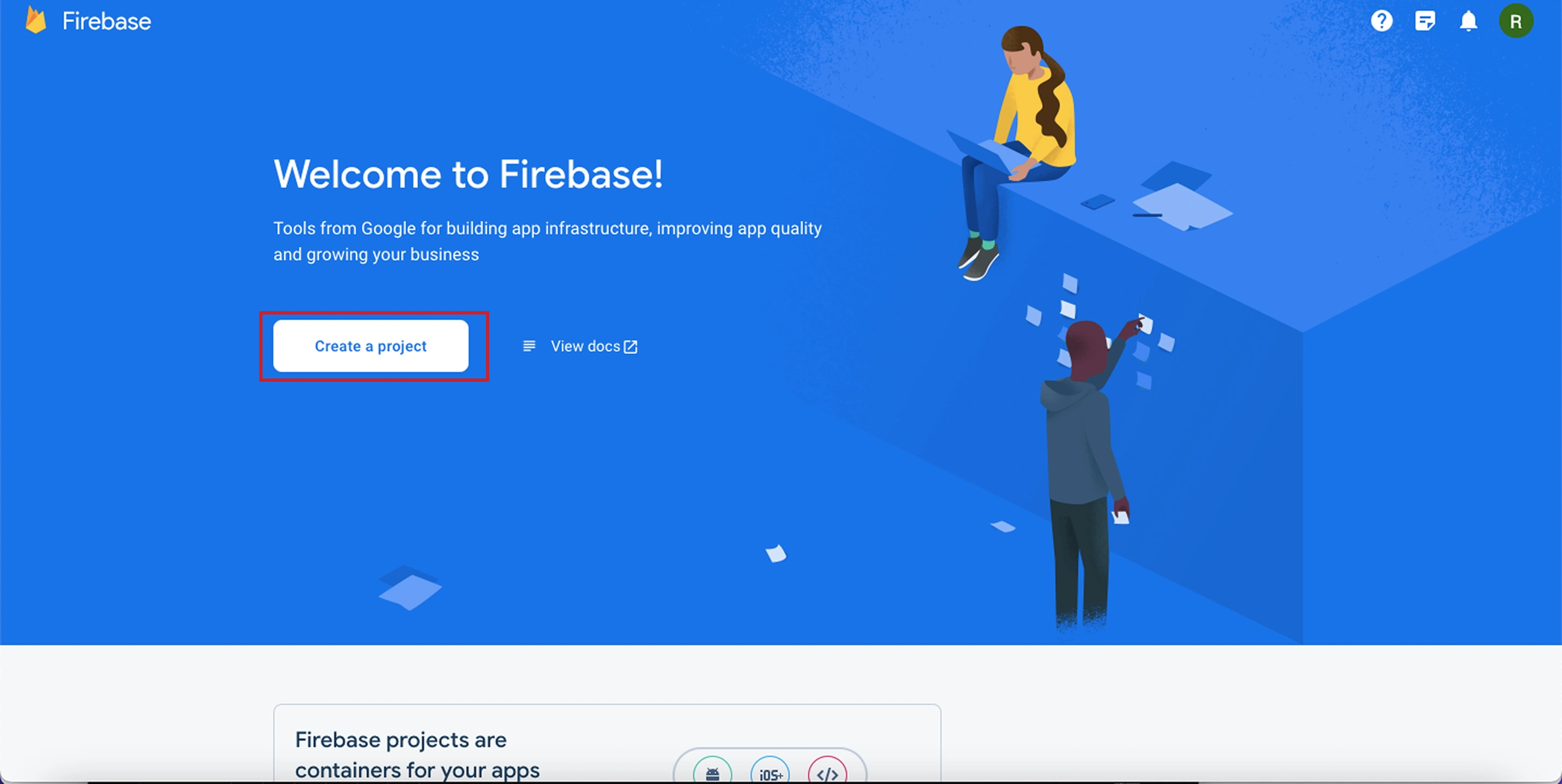
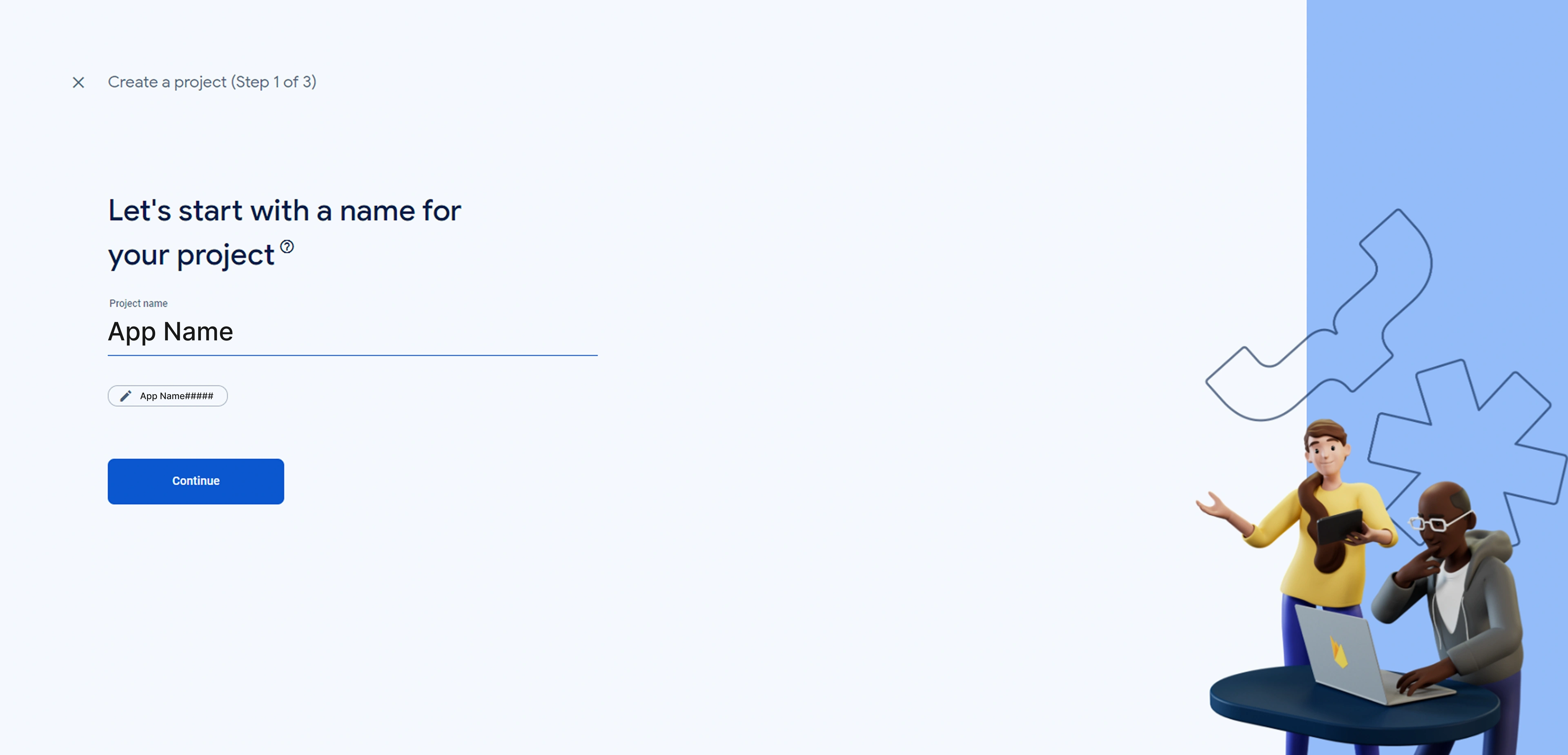
- Go to Firebase Console and create a new project
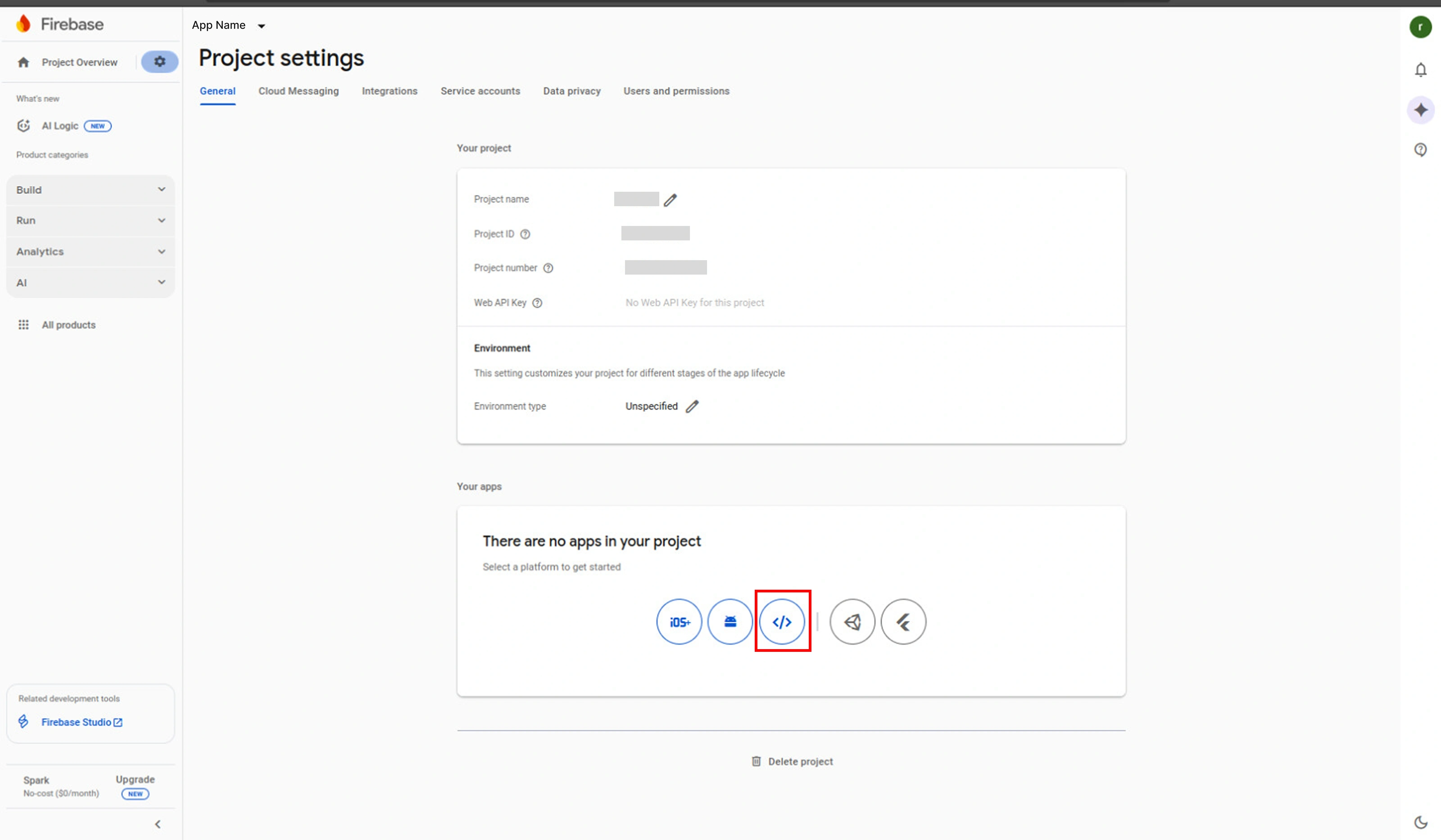
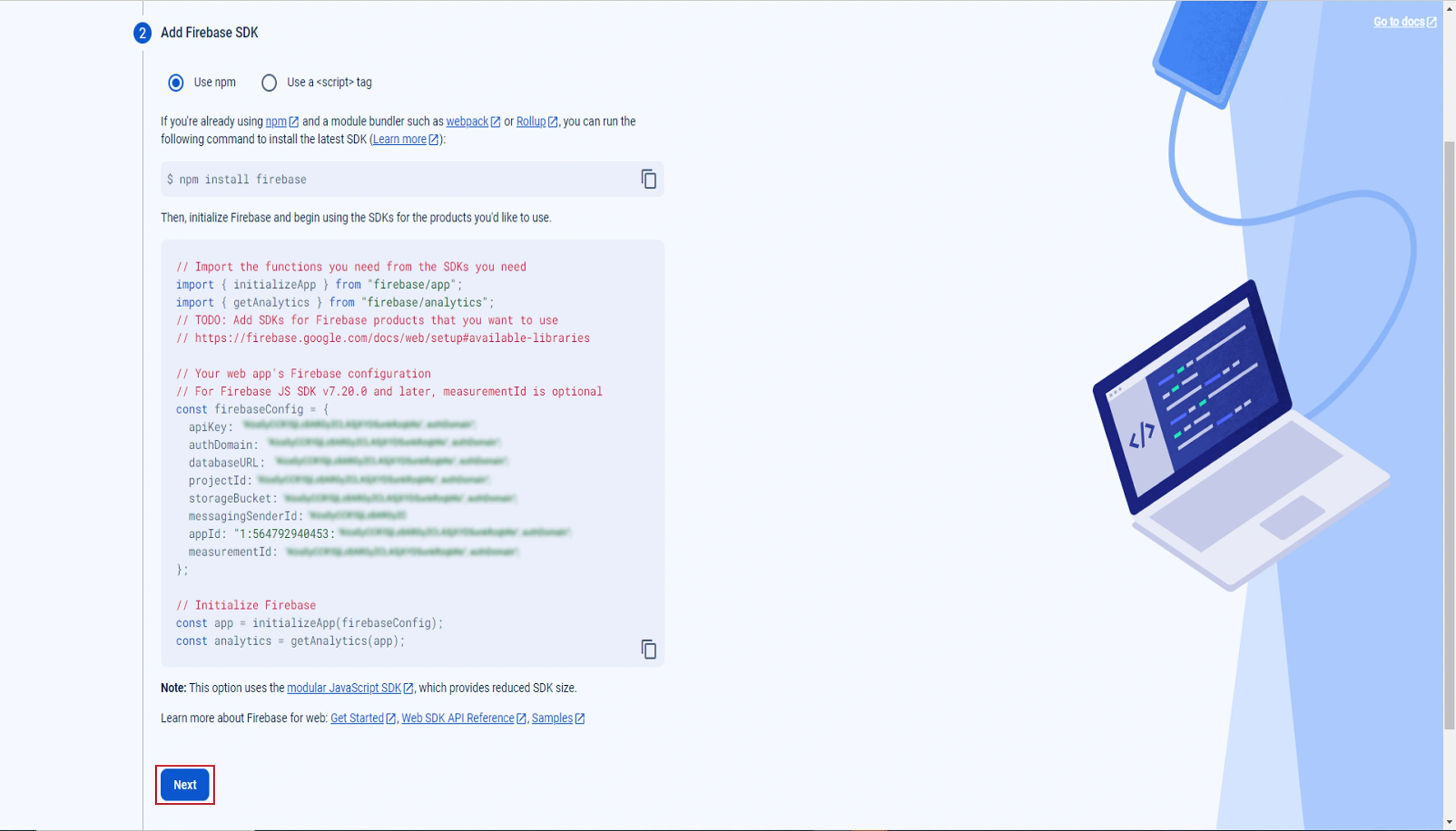
- Create a web app in your Firebase project
Database Configuration
- Navigate to your project dashboard and create the Database
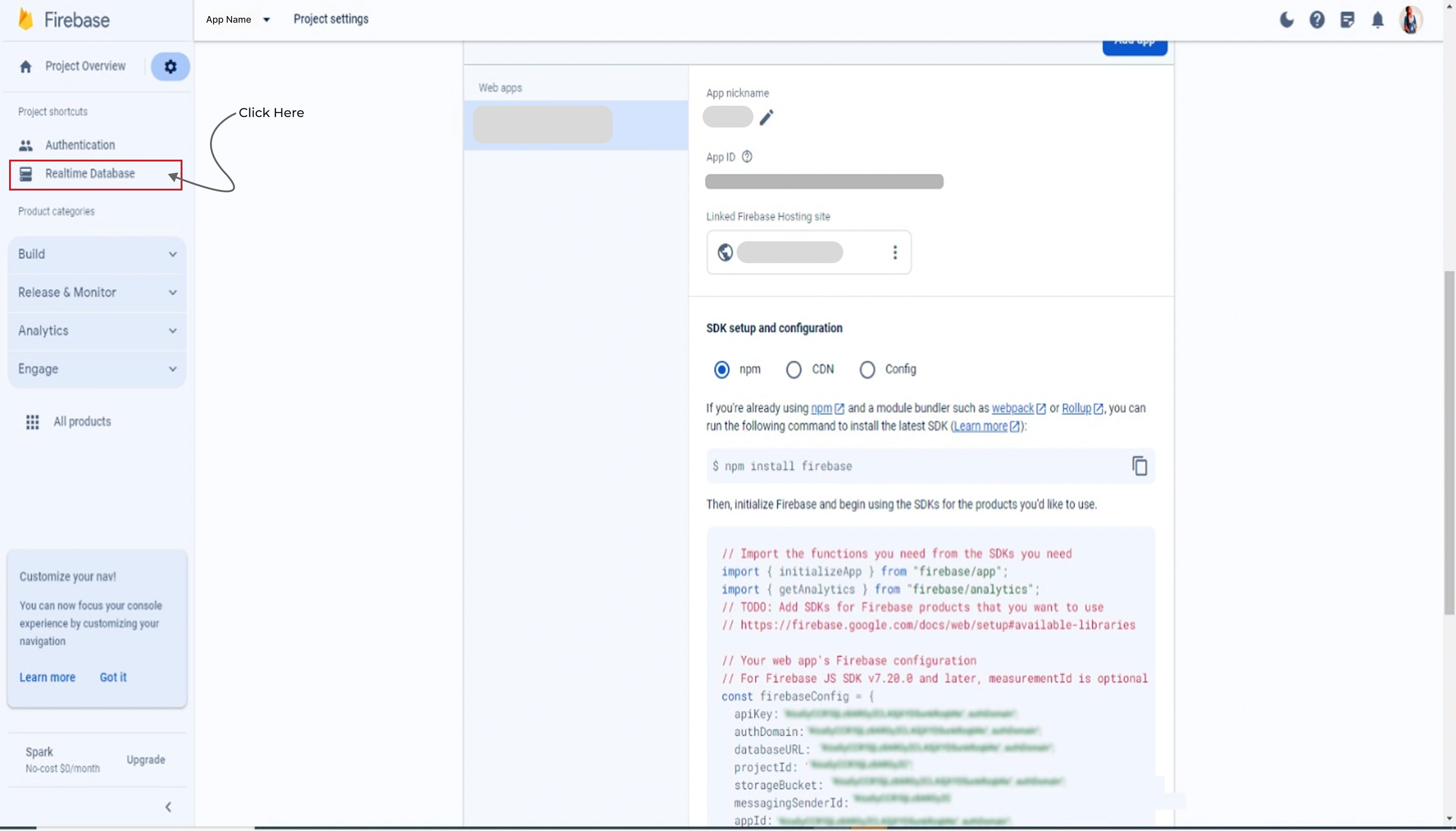
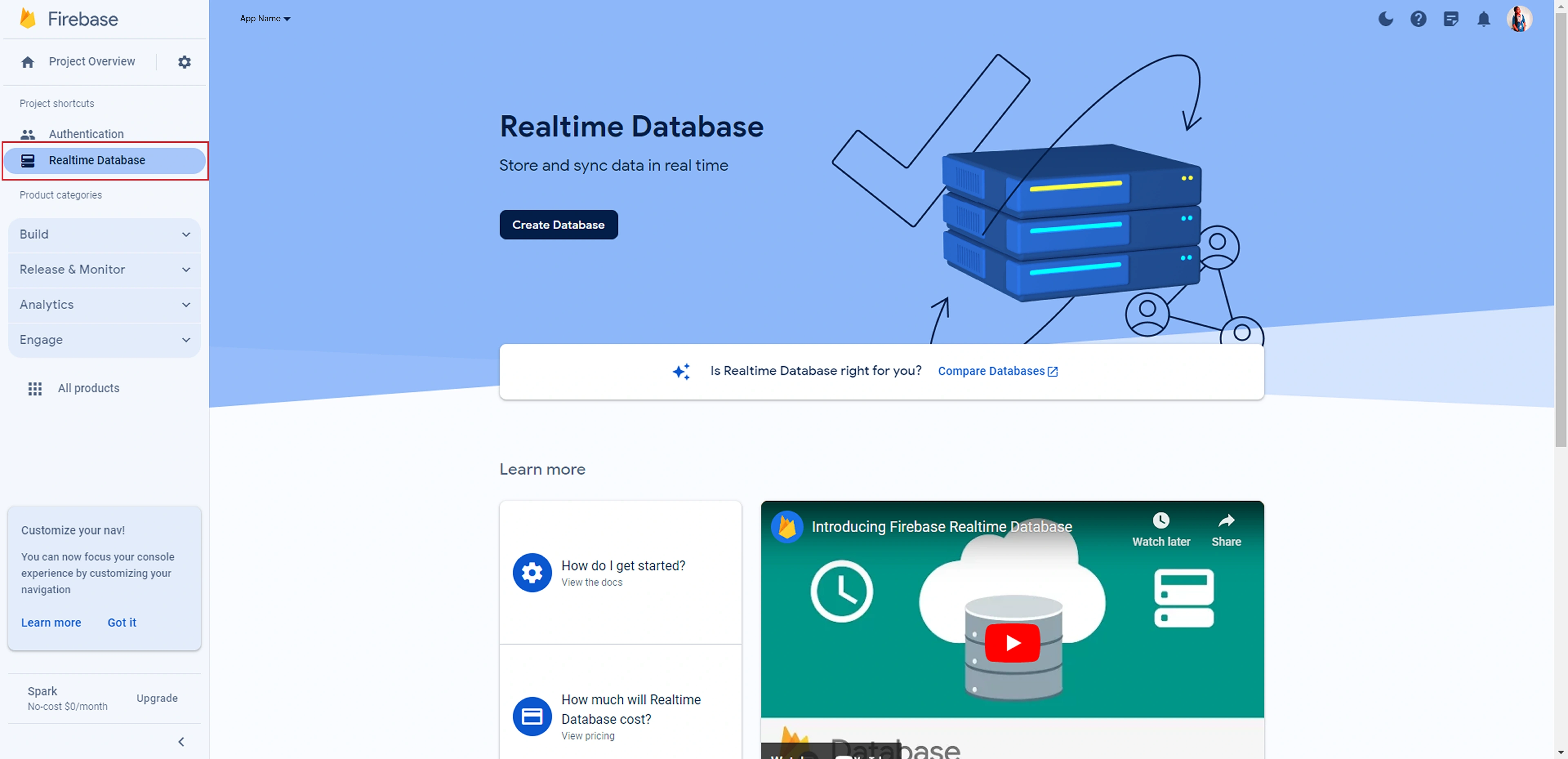
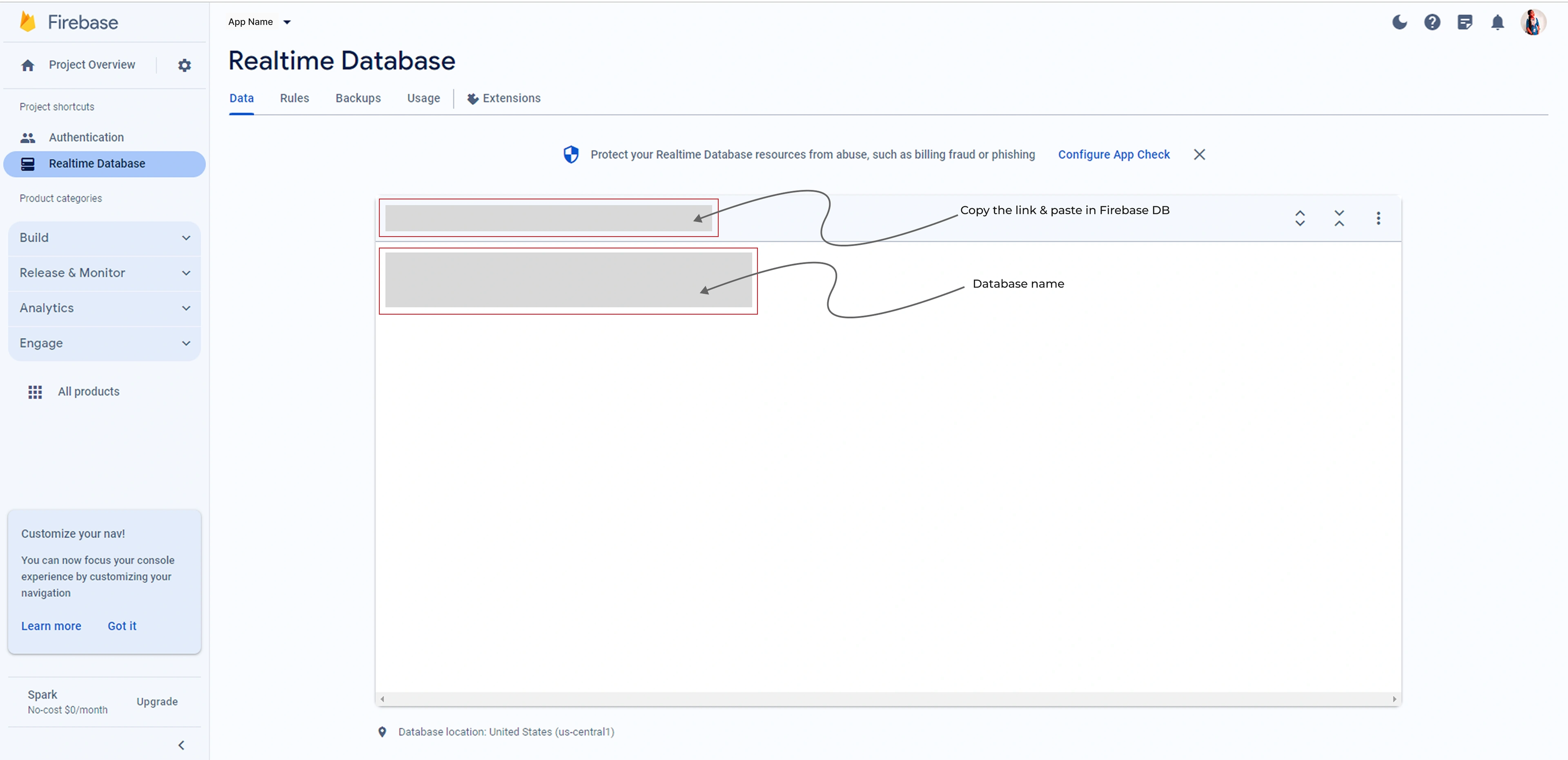
Service Account Setup
- Go to Settings → Project settings → Advanced permissions settings
- Click on "Service Accounts" under Firebase Admin SDK section
- Click "Actions" → "Manage Keys" → "Add Key" → "Create new key"
- Select JSON format and click "Create"
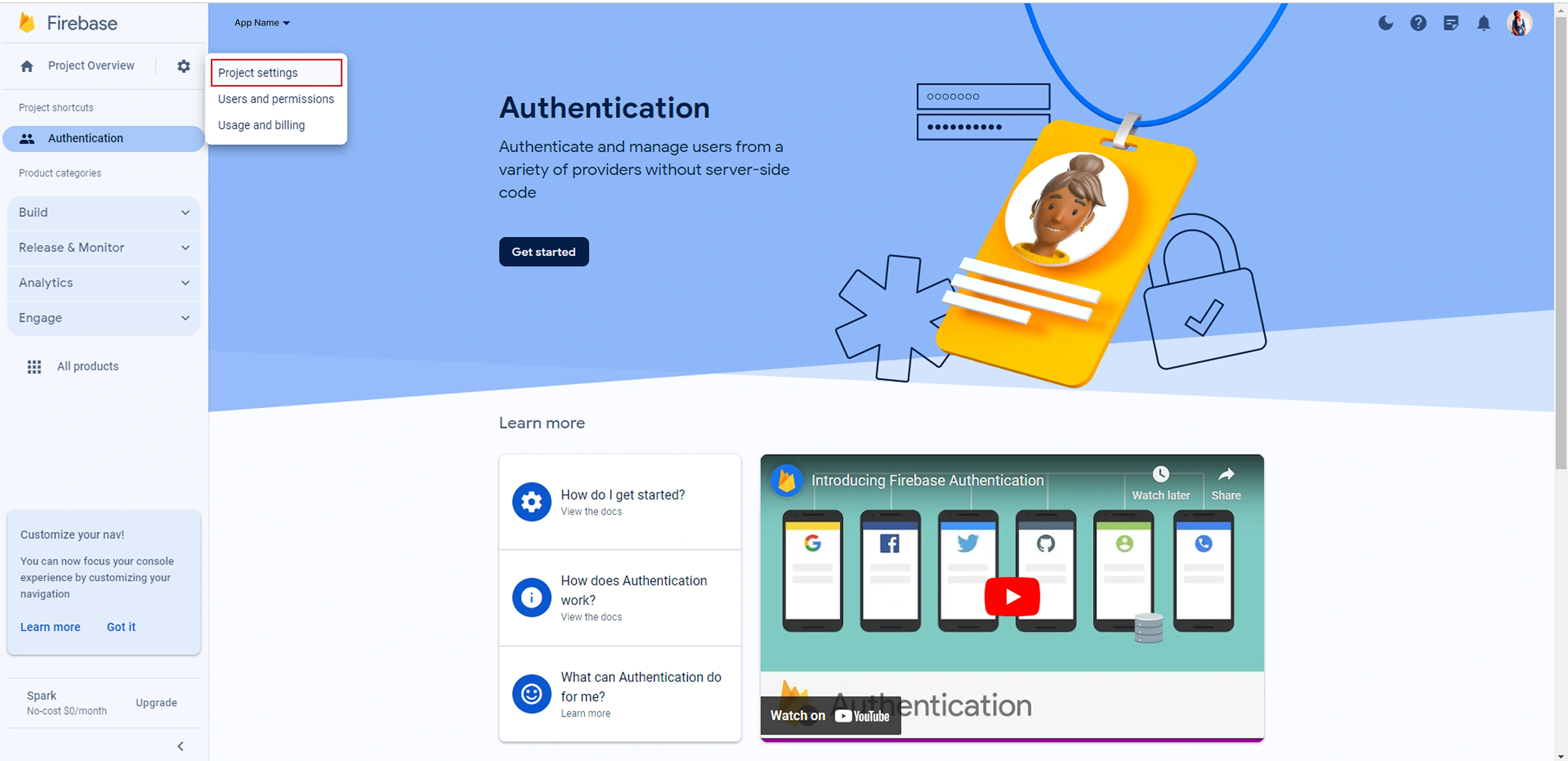
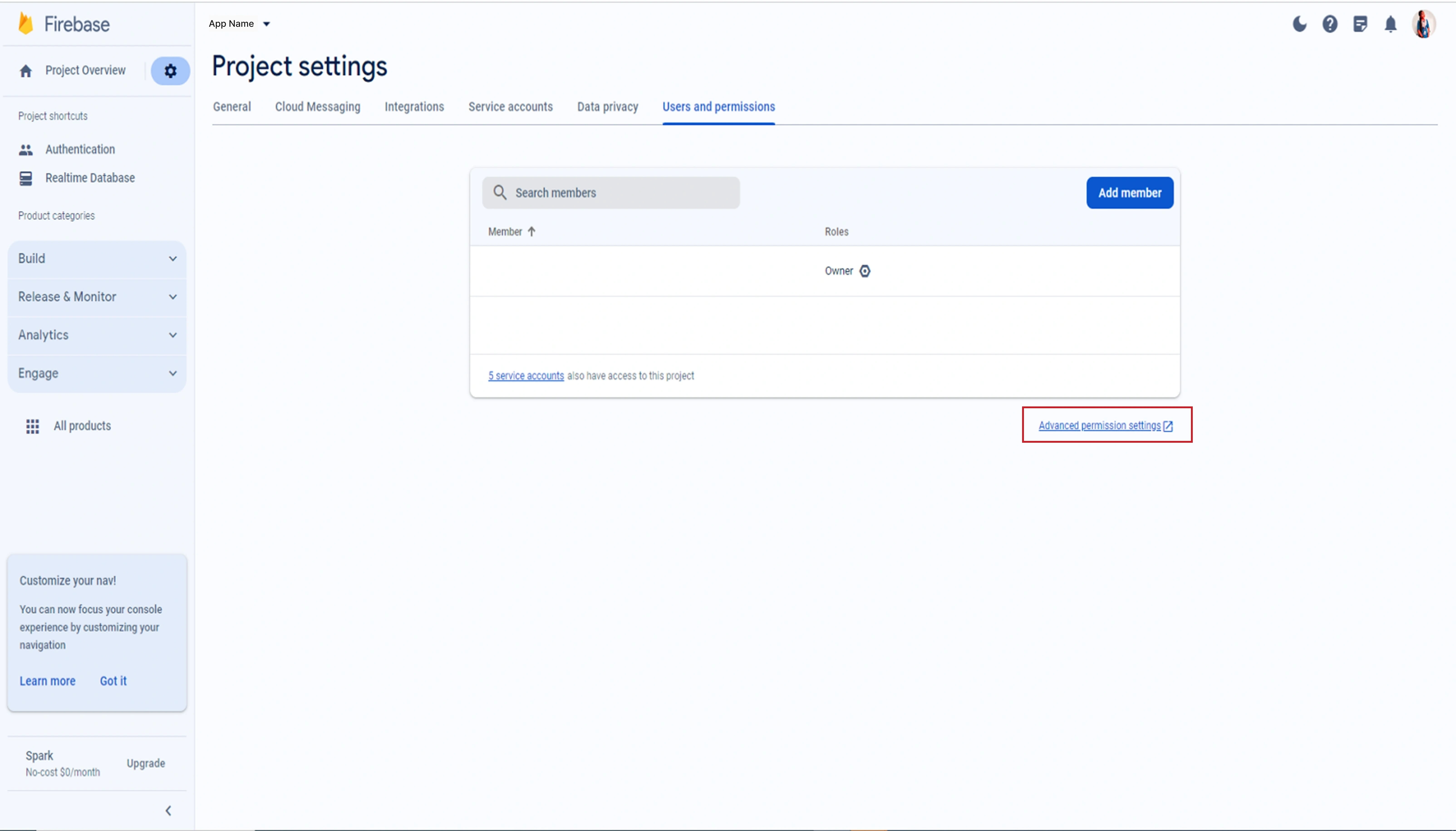
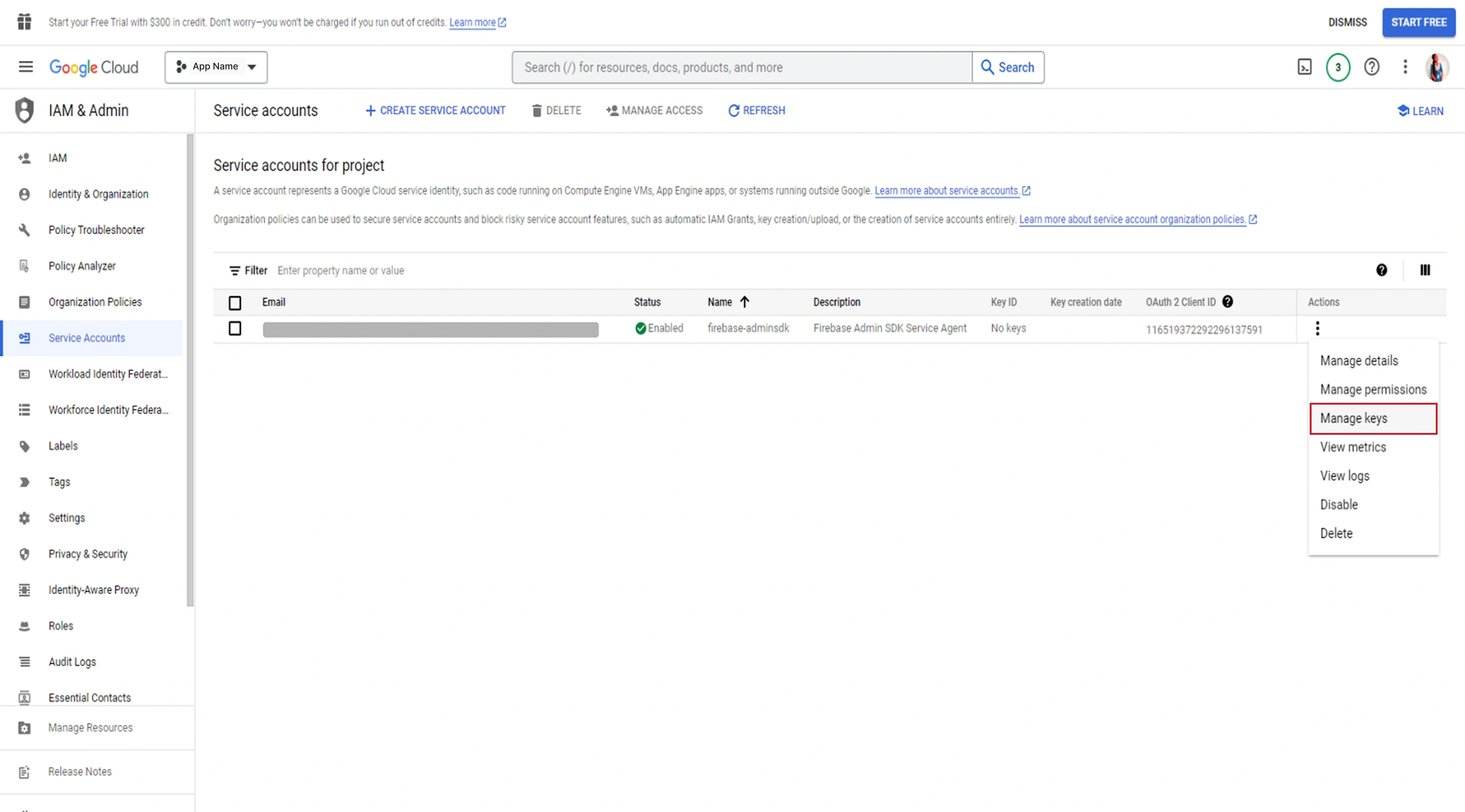
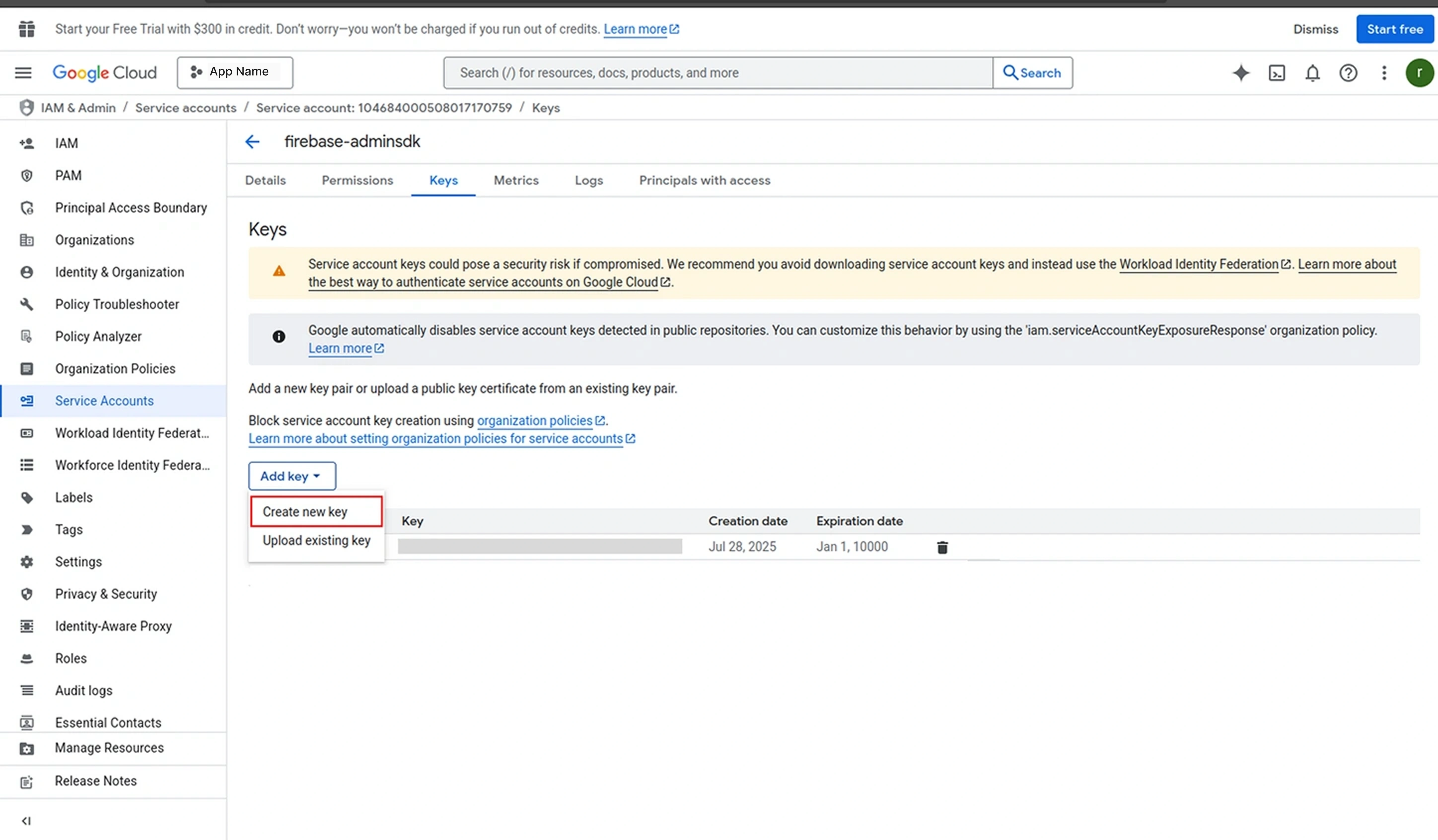
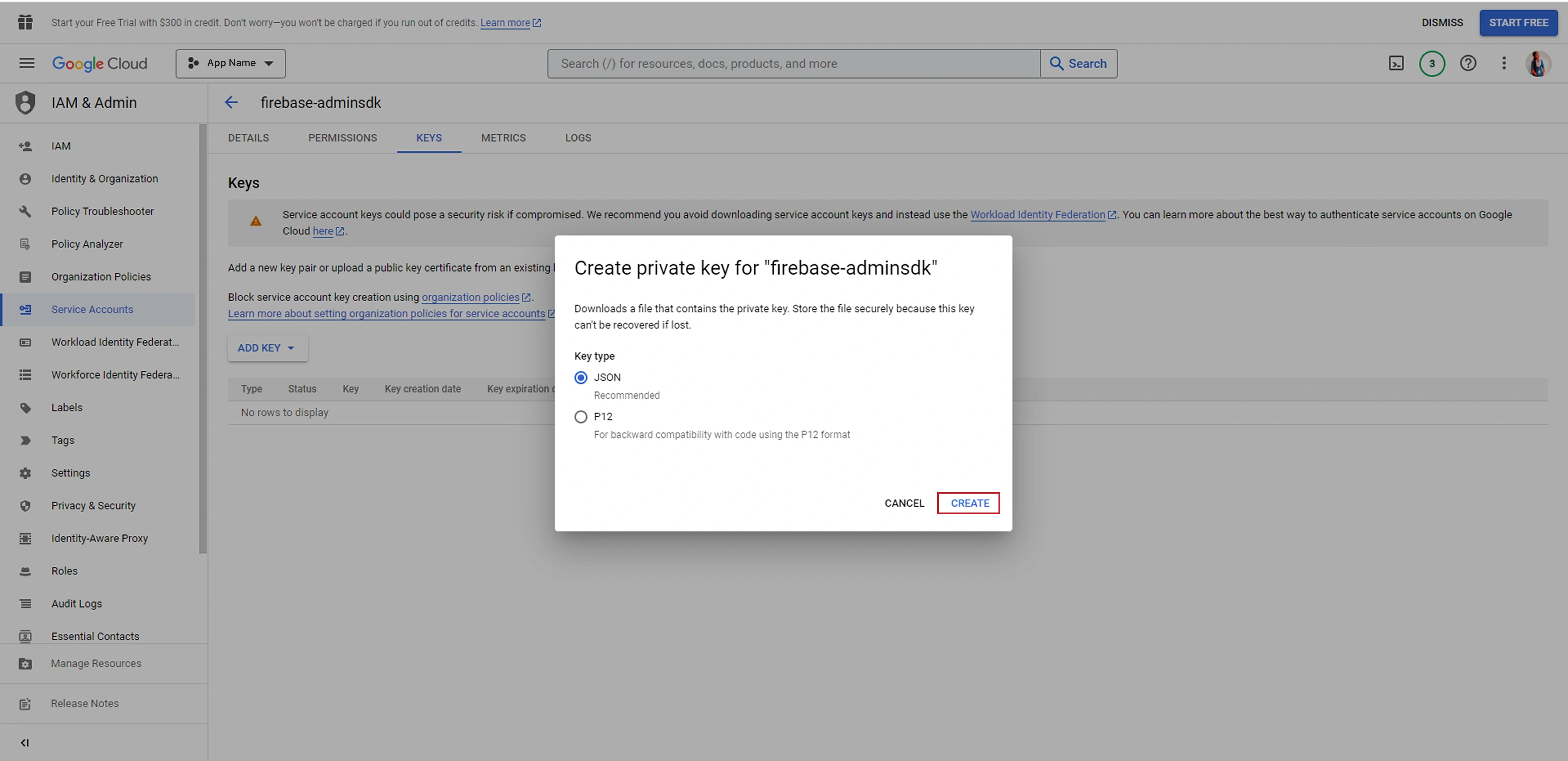
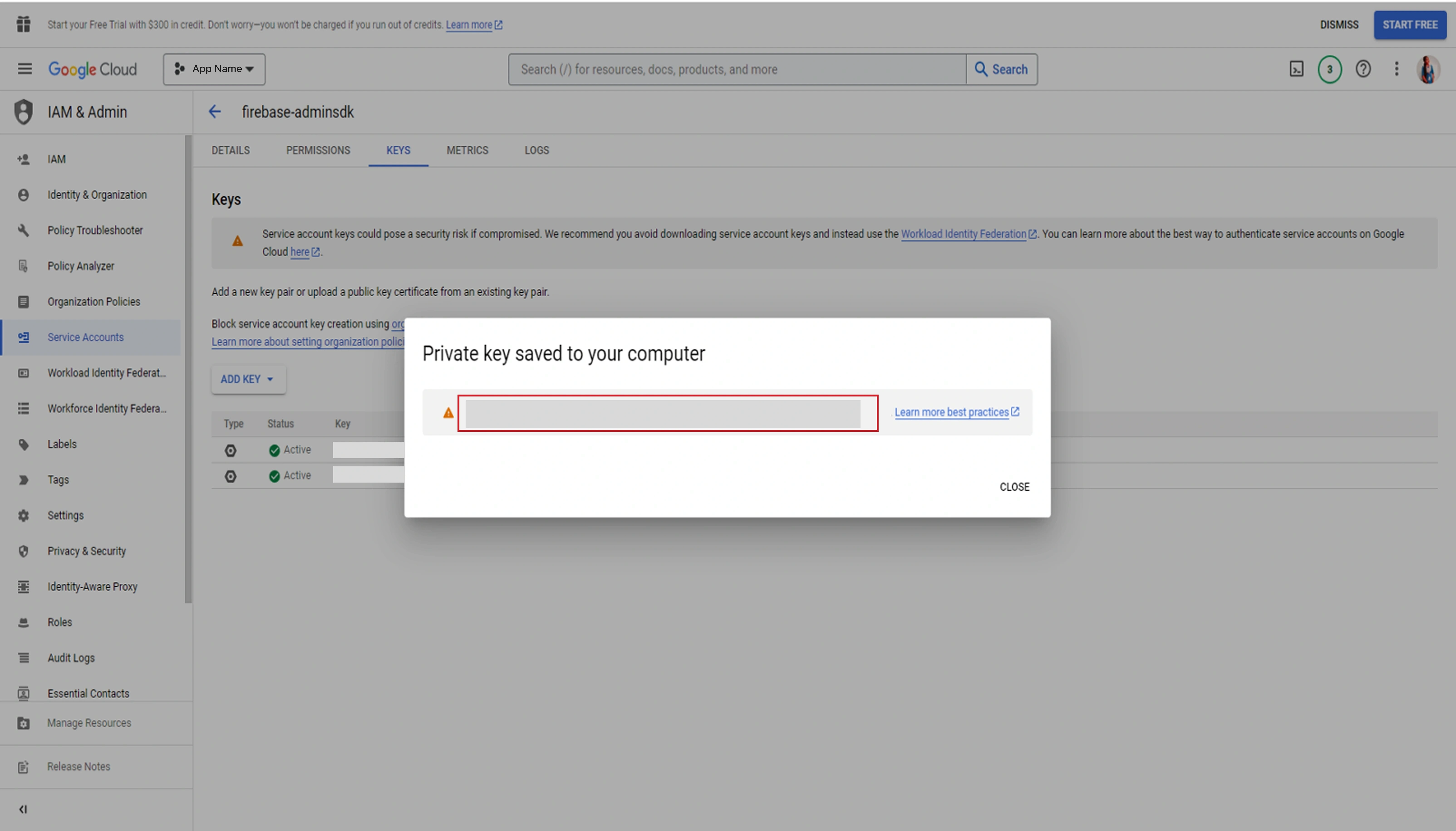
.env Configuration
FIREBASE_CREDENTIALS=firebase.json
FIREBASE_DATABASE_URL=https://your-project-id.firebaseio.com
folder
Place the JSON file in:
/admin/config/firebase.json
Mobile App Configuration
Android Setup
- Select your existing project in Firebase Console
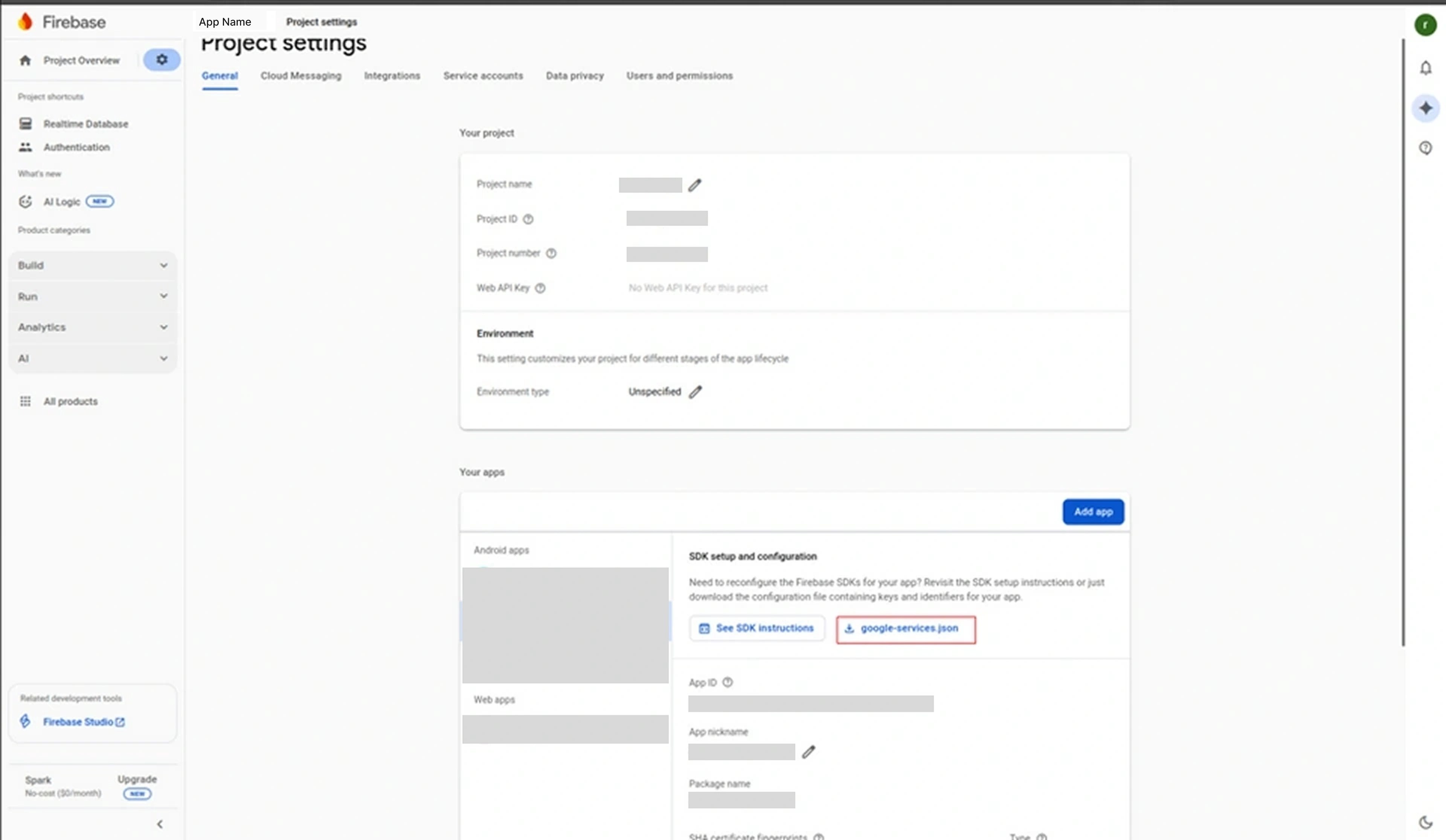
- Click Settings icon → Project settings → Add app → Android
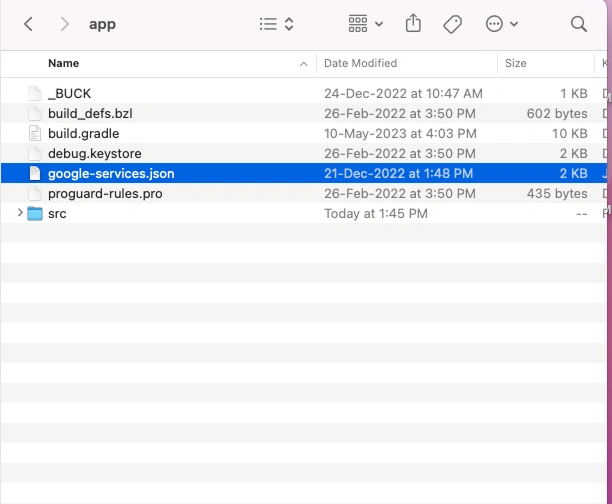
- Download
google-services.jsonfile - Place the file in:
Grab2buy_customer/android/app
info
If you haven't created a Firebase project yet, follow the Admin Configuration steps above first.
Required Firebase Services
admin_panel_settings
Authentication
database
Realtime Database
cloud
Cloud Firestore
notifications
Cloud Messaging
analytics
Analytics
location_on
Geo Locations
fingerprint Bundle ID
Clients must update the bundle identifier to match their application package.
Example: com.clientname.Grab2buy
Android
Update in:
folder_open android/app/build.gradle
applicationId "com.clientname.Grab2buy"
Rename the Java package directory:
folder_open android/app/src/main/java/com/clientname/Grab2buy
key Keystore Configuration
Generate a signing keystore:
keytool -genkey -v \
    -keystore Grab2buy.keystore \
    -alias Grab2buy \
    -keyalg RSA \
    -keysize 2048 \
    -validity 10000
Place the keystore file inside:
folder_open android/app/
Update the signing configuration in:
folder_open android/gradle.properties
MYAPP_UPLOAD_STORE_FILE=Grab2buy.keystore
MYAPP_UPLOAD_KEY_ALIAS=Grab2buy
MYAPP_UPLOAD_STORE_PASSWORD=yourpassword
MYAPP_UPLOAD_KEY_PASSWORD=yourpassword
rocket_launch Android Release Build
Generate APK
cd android
./gradlew assembleRelease
APK location:
android/app/build/outputs/apk/release/app-release.apk
Generate Play Store Bundle
cd android
./gradlew bundleRelease
Output: android/app/build/outputs/bundle/release/app-release.aab
phone_iphone iOS Configuration
iOS development requires a macOS system with Apple Xcode installed. Xcode provides all necessary tools, simulators, and SDKs required to build and run the application on iOS devices.
Ensure that you have the latest version of Xcode installed from the Mac App Store and have accepted all license agreements before proceeding.
download Install iOS Dependencies
The iOS project uses CocoaPods to manage native dependencies. You must install all required pods before running the application.
Follow the steps below:
cd ios
pod install
cd ..
This command installs all required native libraries and links them with your iOS project.
local_fire_department iOS Firebase Setup
Firebase is used for push notifications and other backend services. You need to download and configure the Firebase iOS configuration file.
Step 1: Download Configuration File
GoogleService-Info.plist
Step 2: Add File to Project
Place the downloaded file inside the following directory:
folder_open ios/Grab2buy/GoogleService-Info.plist
Steps in Xcode:
- Open the iOS project in Xcode.
- Drag and drop the
GoogleService-Info.plistfile into the Project Navigator. - Select "Copy items if needed" when prompted.
- Ensure the file is added to the main application target.
This configuration enables Firebase services such as push notifications and analytics.
fingerprint iOS Bundle Identifier
The Bundle Identifier uniquely identifies your application in the Apple ecosystem. It must match the identifier configured in Firebase and Apple Developer account.
Steps:
- Open the project in Xcode:
ios/Grab2buy.xcworkspace - Select the main application target.
- Go to the General tab.
- Update the Bundle Identifier field.
Example: com.clientname.Yourapp
Ensure that the Bundle Identifier matches exactly with the one used in the Firebase configuration file, otherwise services may not work correctly.
image iOS App Icons
Application icons are used across the app, App Store, and device home screen. You need to replace the default icons with your branding assets.
App Icon Path:
folder_open ios/Grab2buy/Images.xcassets/AppIcon.appiconset
Replace all icon sizes inside this folder with your custom icons while maintaining the required dimensions.
iOS App Logo
Replace the main logo used inside the application UI:
folder_open src/assets/logo.png
Recommended size: 500 × 500 PNG (transparent background preferred)
play_arrow Run iOS Application
Before running the application, make sure the Metro bundler is running.
Step 1: Start Metro Server
npm start
Step 2: Run iOS App
npx react-native run-ios
This command will build the app and launch it in the iOS Simulator. Alternatively, you can open the project in Xcode and run it directly on a simulator or a physical device.
rocket_launch iOS Release Build
To publish your application to the App Store, you must generate a release build using Xcode.
Steps:
- Open the project in Xcode:
ios/Grab2buy.xcworkspace - Select Generic iOS Device as the build target.
- From the top menu, select Product → Archive.
- Once the archive is created, open the Organizer window.
- Validate and upload the build to App Store Connect.
After uploading, you can manage your app release from App Store Connect.
api API Configuration
Application API configuration is located in:
folder_open src/config/const.js
Update the following values with client server details:
- BASE_URL
- API_URL
- IMG_URL
- SOCKET_URL (if applicable)
Example:
export const BASE_URL = "https://api.clientdomain.com"
export const API_URL = "https://api.clientdomain.com/v1"
export const IMG_URL = "https://cdn.clientdomain.com"
palette Branding Configuration
Application Logo
Replace the logo file located at:
folder_open src/assets/logo.png
Recommended format: 500 × 500 PNG
Android Launcher Icons
Replace launcher icons in:
folder_open android/app/src/main/res/
Folders:
- mipmap-mdpi
- mipmap-hdpi
- mipmap-xhdpi
- mipmap-xxhdpi
- mipmap-xxxhdpi
iOS App Icons
Replace icons in:
folder_open ios/Grab2buy/Images.xcassets/AppIcon.appiconset
map Map Provider
The application uses MapLibre for map rendering and location-based services.
Map Library Used
@maplibre/maplibre-react-native
Capabilities
layers
Vector Tile Rendering using RouteMappy tiles
map
Real-time map display for ride tracking
navigation
Location-based services for navigation and route
visualization
bolt
High-performance map rendering optimized for mobile
devices
These features enable the application to display locations, trip routes, and navigation paths within the app.
route RouteMappy
warning
Third‑Party Paid Service
RouteMappy is a paid maps service and is not included with the Grab2buy purchase package. You must obtain your own API key from RouteMappy. All subscription costs, licensing fees, and setup are the responsibility of the buyer.
Admin Panel Configuration
Step 1: Enter Your RouteMappy API Key
In the place of enter_map_key in your .env
file, add your RouteMappy API key as shown below:
MAP_KEY=enter_map_key
info
If you need RouteMappy Maps for your application, feel free to contact us. It functions as a customizable map solution, available for purchase.
- Website: https://routemappy.com/
- Email: sales@menpanitech.com
Mobile Application Configuration
Step 1: Add Your API Key
Edit the following file:
folder_open Grab2buy/src/config/Constants.js
export const ROUTEMAPPY_API_KEY = 'enter_your_routemappy_key';
info
If you need RouteMappy Maps for your application, feel free to contact us. It functions as a customizable map solution, available for purchase.
- Website: https://routemappy.com/
- Email: sales@menpanitech.com
payments Payment Integration
Library Used
- react-native-razorpay
- flutterwave-react-native
Features
lock
Secure online payments
directions_car
Ride fare payments
credit_card
Multiple payment methods (Cards, UPI, Net Banking,
Wallets)
Configuration
Payment credentials must be configured on the backend server to enable transaction processing.
Required credentials typically include:
- Payment Gateway API Key
- Secret Key
- Webhook configuration for transaction validation
These credentials are used by the backend API to securely communicate with the payment gateway.
warning
Important Warning
Sensitive credentials such as secret keys must never be stored in the mobile application. All payment validation and transaction verification should be handled securely through the backend server.
notifications FCM Configuration
Modern FCM v1 Setup (OAuth 2.0)
This guide covers the modern Firebase Cloud Messaging v1 API. It uses OAuth 2.0 for secure authentication and provides more features than the deprecated legacy API.
warning
Important
The legacy FCM HTTP API (using Server Keys) is deprecated and will be removed. Always use the Firebase Cloud Messaging HTTP v1 API for all new implementations.
Step 1: Generate Service Account Credentials
-
Access Firebase Console
Go to Firebase Console and select your project.
Navigate to Project Settings (gear icon) → Service accounts tab.
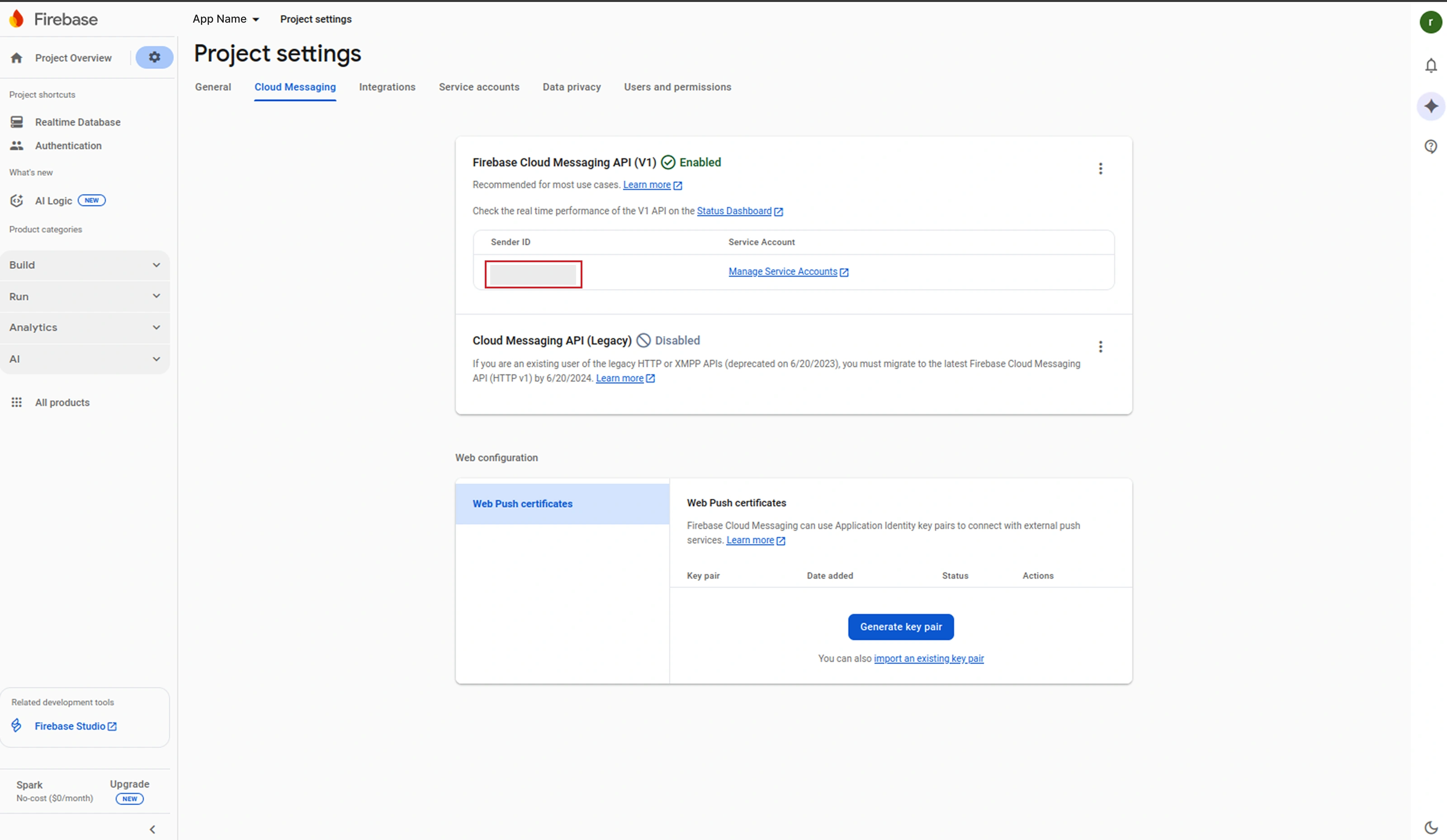
-
Generate a new private key
Click "Generate new private key" in the Firebase Admin SDK section.
Confirm by clicking "Generate key" in the popup.
A JSON file (
your-project-id-firebase-adminsdk.json) will be downloaded automatically. This file contains your service account credentials.shield Security Keep this file secure. It contains sensitive credentials that provide full access to your Firebase services. Never commit this file to a public repository or share it with unauthorized users.
Step 2: Server-Side Configuration
Place the Service Account File
Copy the downloaded JSON file to your project's secure configuration directory:
folder
Recommended Location:
/admin/config/firebase-service-account.json
Configure Environment Variables
Update your backend .env file with the following
configuration:
# Firebase Cloud Messaging v1 Configuration
        FIREBASE_PROJECT_ID=your-project-id
        FCM_DRIVE_PATH=/path/to/firebase-service-account.json
info
Note
The FCM_DRIVE_PATH points to your Firebase Service Account JSON file, and
FIREBASE_PROJECT_ID is your Firebase project identifier, which can be found in the
Firebase Console.
Step 3: Sending Notifications with v1 API
Here's a secure implementation example for sending push notifications using the FCM v1 API with OAuth 2.0 authentication:
// FCM v1 API Notification Sender
        // Uses OAuth 2.0 authentication with service account

        use Google\Cloud\Firestore\FirestoreClient;
        use Google\Cloud\Core\ServiceBuilder;

        // Initialize Firebase with service account
        $firestore = new FirestoreClient([
            'keyFilePath' => env('FCM_DRIVE_PATH'),
            'projectId' => env('FIREBASE_PROJECT_ID')
        ]);

        // Construct the FCM v1 endpoint
        $url = "https://fcm.googleapis.com/v1/projects/" . env('FIREBASE_PROJECT_ID') . "/messages:send";

        // Get OAuth 2.0 access token
        $token = $firestore->getCredentialsFetcher()?->fetchAuthToken();
        $accessToken = $token['access_token'];

        // Construct the notification payload (v1 format)
        $data = [
            "message" => [
                "token" => "device_registration_token_here",
                "notification" => [
                    "title" => "Notification Title",
                    "body" => "Notification Message Body"
                ],
                "data" => [
                    "key1" => "value1",
                    "key2" => "value2"
                ],
                "android" => [
                    "priority" => "high"
                ],
                "apns" => [
                    "headers" => [
                        "apns-priority" => "10"
                    ]
                ]
            ]
        ];

        // Send the notification
        $options = [
            'http' => [
                'header'  => "Authorization: Bearer $accessToken\r\n" .
                              "Content-Type: application/json\r\n",
                'method'  => 'POST',
                'content' => json_encode($data)
            ]
        ];

        $context = stream_context_create($options);
        $result = file_get_contents($url, false, $context);
Troubleshooting
Common Issues:
-
Authentication Failed (401):
Verify the service account JSON file path is correct and the file has proper read permissions. Ensure the project ID matches.
-
Invalid Token (404):
The device registration token may be invalid or expired. Request a new token from the client app.
-
Permission Denied (403):
The service account needs the "Firebase Cloud Messaging Admin" role in IAM settings.
check_circle
Success
The modern FCM HTTP v1 API provides enhanced security, improved reliability, and supports all the latest Firebase Cloud Messaging features.
mail Gmail Configuration
Step-by-Step Configuration
-
Step 1: Access Gmail Account Settings
Log in to your Gmail account and click on your profile picture in the top right corner. Select "Manage your Google Account" from the dropdown menu.
-
Step 2: Enable Security Verification
Navigate to the "Security" tab in the left sidebar.
Under "Signing in to Google," enable 2-Step Verification if not already active.
 info
infoNote: You must have 2-Step Verification enabled to generate an App Password.
-
Step 3: Generate App Password
While still in the Security section:
-
Find the "App passwords" option (under 2-Step Verification)
-
Click "create"
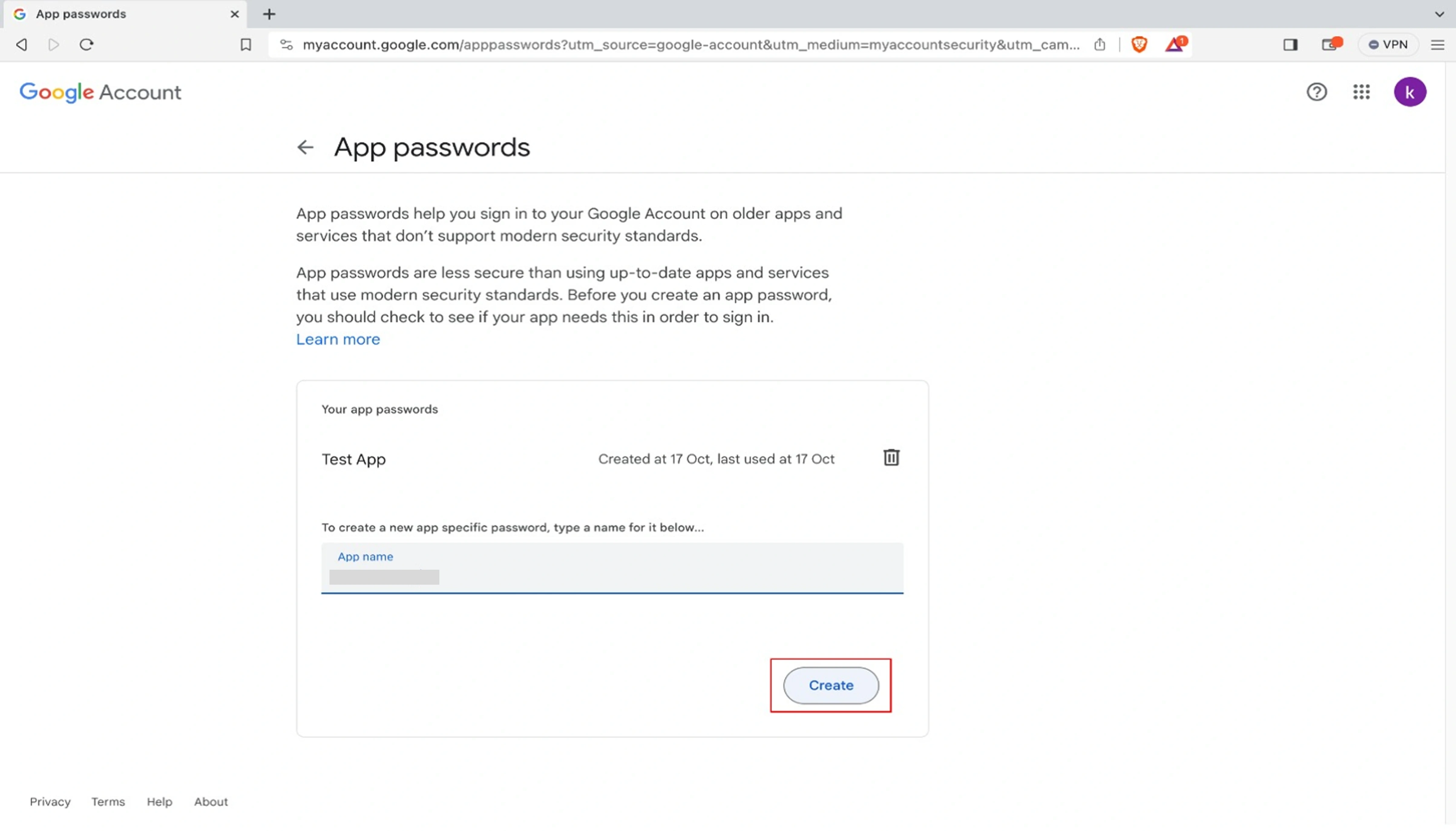
-
Copy the 16-character password shown
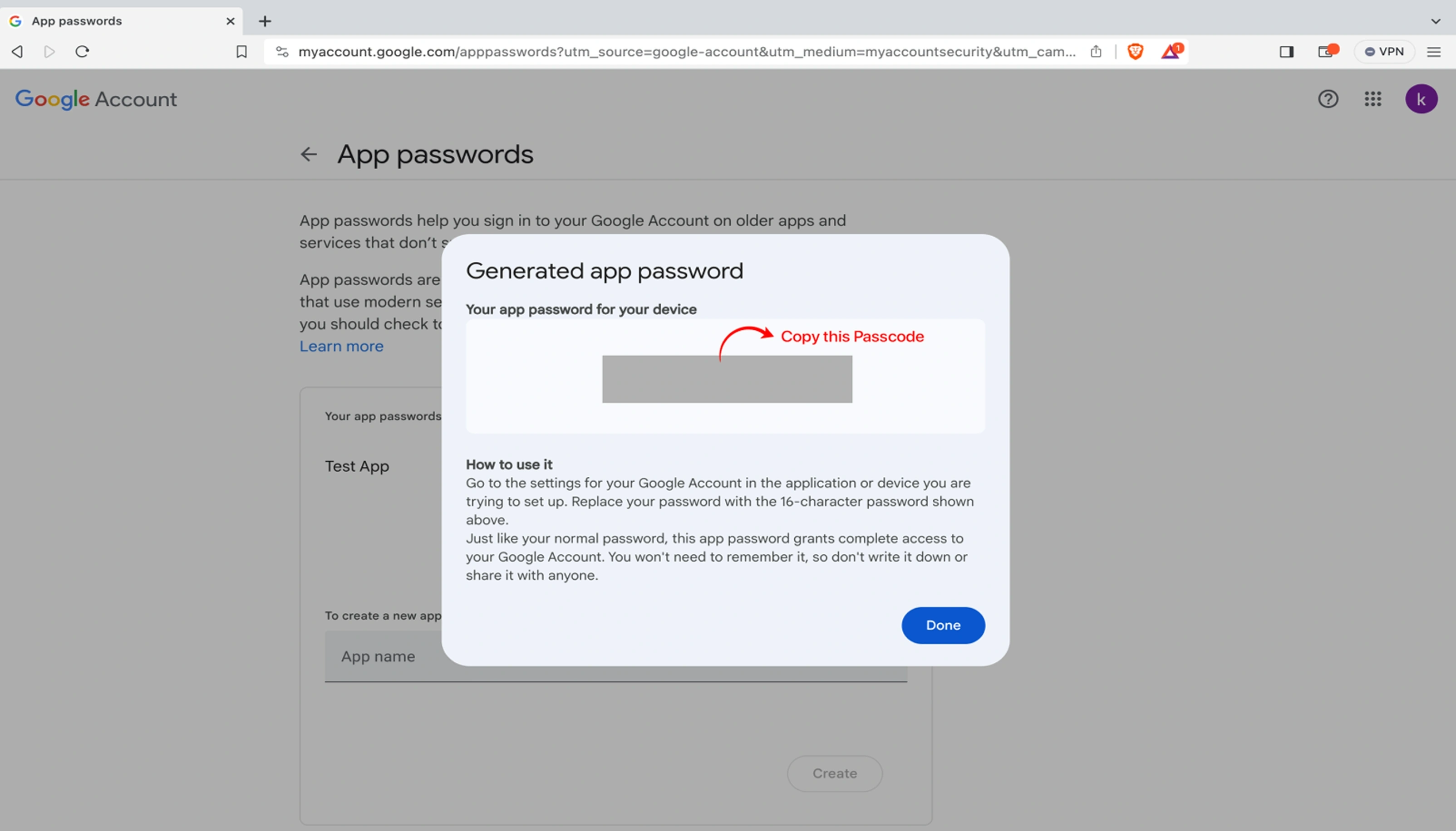
-
.env File Configuration
Add these configurations to your .env file:
MAIL_MAILER=smtp
MAIL_HOST=smtp.gmail.com
MAIL_PORT=587
MAIL_USERNAME=youremail@gmail.com
MAIL_PASSWORD=your_generated_app_password
MAIL_ENCRYPTION=tls
MAIL_FROM_ADDRESS=youremail@gmail.com
MAIL_FROM_NAME="${APP_NAME}"
warning
Important Security Notes:
- Never use your main Gmail password in the .env file
- Always use the generated App Password
- Keep your .env file secure and never commit it to version control
- If compromised, revoke the app password immediately from Google Security settings
Troubleshooting
Common Issues:
-
Authentication Failed:
Verify 2-Step Verification is enabled and you're using an App Password.
-
Connection Timeout:
Check if your server/firewall allows outbound connections on port 587.
-
Daily Limit Exceeded:
Gmail has sending limits (500 emails/day for free accounts).
devices Device Configuration
Application Deployment Guide
info
Advisable: Copy the source files to D: or E: drive rather than C: drive.
Environment Setup
- Connect your device via USB
- Verify connection:
adb devicesConfirm the device appears in the list.
check_circle
Prerequisites
- Android Studio with SDKs installed
- Active emulator/device visible via adb
- Developer options enabled on physical devices
Build & Run Process
- Launch Command Prompt
- Navigate to project directory:
cd D:\Grab2buy_customer- Install project dependencies:
npm install- Execute the application:
npx react-native run-androidhelp_outline FAQ & Troubleshoot
help_outline Frequently Asked Questions & Troubleshooting
This section covers common issues and solutions encountered during setup, deployment, and daily use of the Grab2Buy platform.
error
1. Dependencies Installation Failed (npm install)
Cause: Incorrect Node.js version, network issues, or corrupted cache.
Solution:
- Make sure Node.js 18+ is installed and active.
- Navigate to the correct project directory (Customer App, Vendor App, or Delivery Partner App).
- Run:
npm install
- If the problem persists, clear the cache:
rm -rf node_modules package-lock.json
npm cache clean --force
npm install
error 2. Module Not Found / Import Error
Cause: Missing packages or incorrect import paths after an update.
Solution:
- Ensure all source files are correctly extracted.
- Reinstall dependencies with
npm install. - Check that the imported module name matches the installed package.
- Restart the Metro bundler:
npx react-native start --reset-cache
error 3. Firebase Configuration Issues
Cause: Firebase project not properly linked or config files missing.
Solution:
- Download
google-services.json(Android) andGoogleService-Info.plist(iOS) from your Firebase console. - Place them in the correct folders:
- Android:
android/app/ - iOS: root of the Xcode project (via Xcode)
- Android:
- Verify that Firebase Cloud Messaging (FCM) is enabled for push notifications and real-time alerts.
- Check that the package name / bundle ID matches the Firebase project settings.
- For Admin Panel: Place the service account JSON file in
admin/config/and update.envwithFIREBASE_FILEandFIREBASE_DB.
error 4. Environment Variables Not Configured
Cause: The .env file is missing or contains wrong values.
Solution:
- For the admin backend, copy
.env.exampleto.envand fill in database, mail, map, and payment keys. - For the mobile apps, update the API base URL and any service keys in the environment configuration files.
- For the landing page, create
.envin thefrontend/folder withVITE_API_URLandVITE_UPLOAD_URL. - Restart the development server after any changes.
Example (Admin .env):
APP_URL=http://your-server-url
DB_DATABASE=grab2buy_db
FIREBASE_FILE=service-account.json
RAZORPAY_KEY=your_razorpay_key
error 5. Android Device Not Detected
Cause: USB debugging disabled or missing drivers.
Solution:
- Enable Developer Options and USB Debugging on your Android device.
- Connect via a data-capable USB cable.
- Run
adb devicesin a terminal and accept the authorization prompt on the phone.
adb devices
error 6. Application Stuck on Splash Screen / Not Loading
Cause: Backend URL misconfigured, invalid JSON response, or network restrictions.
Solution:
- Double-check the API base URL in the mobile app configuration (
src/config/Constants.js). - Make sure the Laravel backend is running (
php artisan serve). - Check browser console or React Native debug logs for errors.
- Clear app cache and restart the bundler.
error 7. Admin Panel Database Import Fails
Cause: Incorrect database credentials or large SQL file timeout.
Solution:
- Create a fresh database via phpMyAdmin or command line.
- Import the provided
.sqlfile using phpMyAdmin's Import tab or via command line:
mysql -u root -p grab2buy_db < grab2buy_admin.sql
- Update
.envwith correct DB credentials and restart the backend.
error 8. Push Notifications Not Working
Cause: FCM server key missing, or notification channels not set up.
Solution:
- Go to Admin Panel → Announcements → Customer/Vendor/Delivery Notifications and verify the FCM configuration.
- Ensure the app has granted notification permissions.
- Check that
@react-native-firebase/messagingis correctly linked. - Test from the admin panel using the "Send Notification" feature.
- Verify
google-services.json(Android) andGoogleService-Info.plist(iOS) are properly placed.
error 9. Map Not Displaying / Location Issues
Cause: RouteMappy API key invalid, or location permissions denied.
Solution:
- Verify the RouteMappy API key in Admin → Configuration → Map Settings and in the mobile app configuration.
- Ensure location permissions are enabled for the app (device settings).
- Check that the device has an active internet connection.
- Restart the app after changing permissions.
- Contact RouteMappy team at sales@menpanitech.com for map service queries.
error 10. Vendor/Delivery Partner Registration Stays Pending
Cause: The admin has not yet reviewed the user's documents.
Solution:
- Login to Admin Panel → Vendors or Delivery Partners and locate the pending user.
- Click on the user, review the uploaded KYC and documents.
- Approve the account; they will receive a notification immediately.
error 11. Payment Gateway Not Working (Razorpay/Flutterwave/PhonePe)
Cause: API keys are incorrect or set to live mode without proper activation.
Solution:
- Go to Admin Panel → Payments → Payment Modes and ensure the gateway is enabled.
- Double-check the API keys in the
.envfile (e.g.,RAZORPAY_KEY,FLUTTERWAVE_KEY). - Use test/sandbox keys first to verify the flow.
- Check that the webhook URL (if required) is correctly configured in the payment gateway dashboard.
error 12. OTP Not Received During Login
Cause: SMS gateway misconfiguration or insufficient balance.
Solution:
- Verify SMS provider credentials in the
.envfile. - Check your SMS provider account balance and trial limitations.
- Make sure the phone number is entered with the correct country code.
- Retry after a short delay; carrier delays can occasionally occur.
error 13. Landing Page Not Showing Dynamic Content
Cause: API endpoint misconfigured or CMS sections not created.
Solution:
- Check
VITE_API_URLinfrontend/.envpoints tohttp://localhost:8000/api(or your live backend). - Log into Admin Panel → Website Settings and ensure sections are created and set to Active.
- Add content under Website Settings → Hero Slides, Features, Testimonials, Landing FAQs, etc.
- Refresh the landing page after making changes.
error 14. Banners or Images Not Uploading in Admin
Cause: File size too large, unsupported format, or permission issues on the uploads folder.
Solution:
- Use JPG, PNG, or WebP images under 2 MB.
- Ensure the
storagefolder has write permissions andphp artisan storage:linkhas been executed. - In the Admin .env, check that
APP_ASSET_URLis set correctly.
error 15. Vendor App Order Notifications Not Working
Cause: Vendor is offline, sound alert disabled, or Firebase connection issue.
Solution:
- Confirm the vendor has set their status to Online in the vendor app.
- Check that sound alert is enabled in the vendor app settings.
- Verify Firebase Realtime Database connection and permissions.
- In Admin Panel → Vendors, check the vendor's online status and order availability.
error 16. Customer Unable to Place Order
Cause: Vendor out of stock, delivery radius exceeded, or payment failure.
Solution:
- Check that the vendor has stock available for the requested product.
- Verify the customer's location is within the vendor's delivery radius.
- In Admin Panel → Vendors, check the vendor's online status.
- Verify payment gateway configuration and test with a different payment method.
error 17. iOS Build Fails with "No such module" Error
Cause: CocoaPods not installed or outdated.
Solution:
- Navigate to the iOS directory:
cd ios && pod install
- If issues persist, update CocoaPods:
sudo gem install cocoapods - Open the
.xcworkspacefile (not.xcodeproj) in Xcode.
error 18. Filament Shield Permissions Not Working
Cause: Shield permissions not generated or super_admin role not assigned.
Solution:
- Run the Shield generation command:
php artisan shield:generate --all --option=permissions --panel=admin
- Assign super_admin role to the admin user via Tinker:
php artisan tinker --execute="
                \$role = DB::table('roles')->where('name','super_admin')->first();
                \$perms = DB::table('permissions')->pluck('id')->toArray();
                \$rows = array_map(fn(\$id) => ['permission_id'=>\$id,'role_id'=>\$role->id], \$perms);
                DB::table('role_has_permissions')->insertOrIgnore(\$rows);
                DB::table('model_has_roles')->insertOrIgnore(['role_id'=>1,'model_type'=>'App\\\Models\\\User','model_id'=>1]);
                echo 'Done: Admin assigned to super_admin role';
                "
error 19. Delivery Partner Location Not Updating on Customer Map
Cause: Fused location not enabled, GPS signal weak, or Firebase sync issue.
Solution:
- Ensure the delivery partner has GPS enabled and is online.
- Check that
react-native-fused-locationis properly configured. - Verify Firebase Realtime Database is correctly syncing location data.
- Check internet connectivity on the delivery partner's device.
error 20. Admin Panel UI Issues (Filament)
Cause: Assets not compiled or cache issues.
Solution:
- Recompile assets:
npm run build
- Clear Laravel cache:
php artisan optimize:clear
support_agent Need Additional Help?
If you encounter any issues not covered here, our support team is ready to assist.
Support Email:
Support Hours:
Monday – Friday
Response Time: Within 24–48 Business Hours
When contacting support, please include:
- Purchase Code
- Application Version
- Server Details (PHP version, database type)
- Error Screenshots or log snippets
- Steps to Reproduce the issue
This information helps us resolve your problem faster.
support_agent Contact Us
support_agent
Need Help?
If you encounter an error that is not listed above, please feel free to contact our support team for further assistance. We’re here to help.
Custom Development Services
If you need any custom work, additional features, or modifications to this application, our team is ready to help you build and scale your project efficiently.
What We Can Help With
code
Custom feature development based on your business needs
palette
UI/UX design improvements and branding customization
integration_instructions
Third-party API integrations (payment, SMS, maps, etc.)
speed
Performance optimization and scalability improvements
cloud_upload
Full project setup and deployment assistance
rocket_launch
Building large-scale applications from scratch
Hire Us
You can hire our development team for complete project development, from idea to deployment, including frontend, backend, and server setup.
call
Phone Number
+91 9150 441 443
language
Website
https://menpanitech.com/
mail
Email
sales@menpanitech.com
info
Important Note
Custom development services may involve additional cost and timeline depending on the scope and complexity of the project.
We’re happy to collaborate and bring your ideas to life